
License and Contracts Manager (LCM) is Licenseware's system of record for software contracts and the licenses (entitlements) granted under them. It replaces the spreadsheets, shared drives, and inboxes that most ITAM teams still use to track what they've bought, when it expires, and how it's being consumed.
This article explains what LCM does, how it fits with the rest of the Licenseware platform, and where to go next.
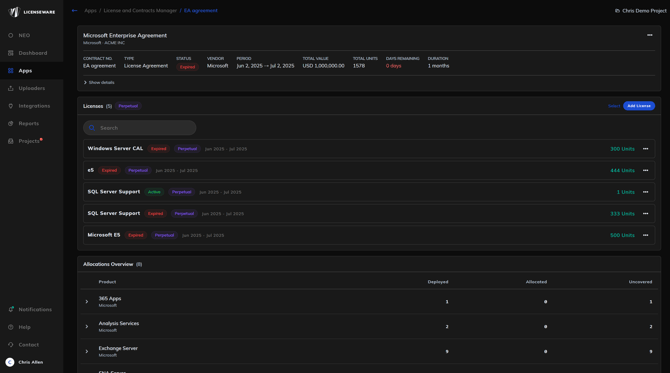
What LCM is for
Storing and managing software agreements in one place, with full vendor, commercial, and renewal metadata.
Capturing every license granted under those agreements, with the metric and quantity entitled.
Allocating licenses to deployments (or to organisational reservations like CALs and business unit pools) so you can see, in real time, what's covered and what isn't.
Tracking renewals and surfacing them through dashboards and reminders so contracts don't auto-renew or lapse without you noticing.
Producing a foundation for AI contract analysis. Uploaded PDFs become the input for NEO Insights, which delivers full risk assessments, market benchmarks, and negotiation playbooks.
How LCM fits with the rest of the platform
LCM is the entitlement side of the SAM equation. The deployment apps (Software Inventory Manager, the vendor-specific managers for Microsoft, Oracle, Adobe, Red Hat, Java, and the Infrastructure Mapper) tell you what's deployed in your environment. LCM tells you what's licensed. The link between the two happens when you allocate a license to a deployment, which produces the Deployed / Allocated / Uncovered view that compliance and optimisation decisions are made from.
NEO sits on top of all of this. It reads contracts uploaded to LCM and produces analysis that would otherwise take a legal team several days per agreement.
Core capabilities
| Capability | What it does |
|---|---|
| Contract management | Create, edit, and bulk-upload contracts with full vendor, commercial, and renewal metadata |
| License management | Capture licenses with or without a parent contract; bulk-upload via Excel template |
| Document upload | Attach PDFs (master agreements, order forms, addenda) to any contract |
| Allocations | Allocate licenses to deployments (Track Deployment) or to organisational pools (Custom Reservation) |
| Custom fields | Add per-record custom fields, or define project-wide schema extensions through Settings templates |
| Renewal reminders | Configure email alerts at custom intervals before expiry |
| Reports | Two project-level reports covering portfolio composition and upcoming renewals |
| NEO Insights | AI-powered contract risk and benchmark analysis on uploaded PDFs |
Where to go next
If this is your first time using LCM, start with Getting Started: Your First Contract.
For loading historical data in bulk, see Bulk Upload: Contracts and Licenses Template.
For linking licenses to what's actually being deployed or reserved, see Allocating Licenses.
For the dashboards that surface portfolio composition and renewal pressure, see LCM Reports.
For the full field list, see the LCM Schema Reference.