
Microsoft SCCM has a SQL Server DB component that stores all the data collected by SCCM. In order to query the DB, you'll need to satisfy the following requirements:
- Install SQL Server Management Studio (SSMS)
- Make sure that you have access to the SCCM DB
Once the above requirements are satisfied, you can execute the Licenseware Query for SIM. In order to do that, you'll need to follow these simple steps:
- Open SQL Server Management Studio
- Logon using an account that has rights
- On the left, expand Database and select your SCCM Database. The SCCM database is the one named CM_XXX
- Right-click the database and select New Query
- In the Query pane, enter the SQL query from the section below (code pane)
- Hit the Execute button or hit the F5 key
- Your results show in the bottom pane
Once the query has been executed you'll be able to export it as CSV.
- Right-click on the Results tab
- Save Results As…
- Select CSV
***IMPORTANT***
In the Results to Grid section, please make sure that the options Include column headers in the result set and Quote strings containing list separators when saving .csv results are ticked in the Results to Grid setting.
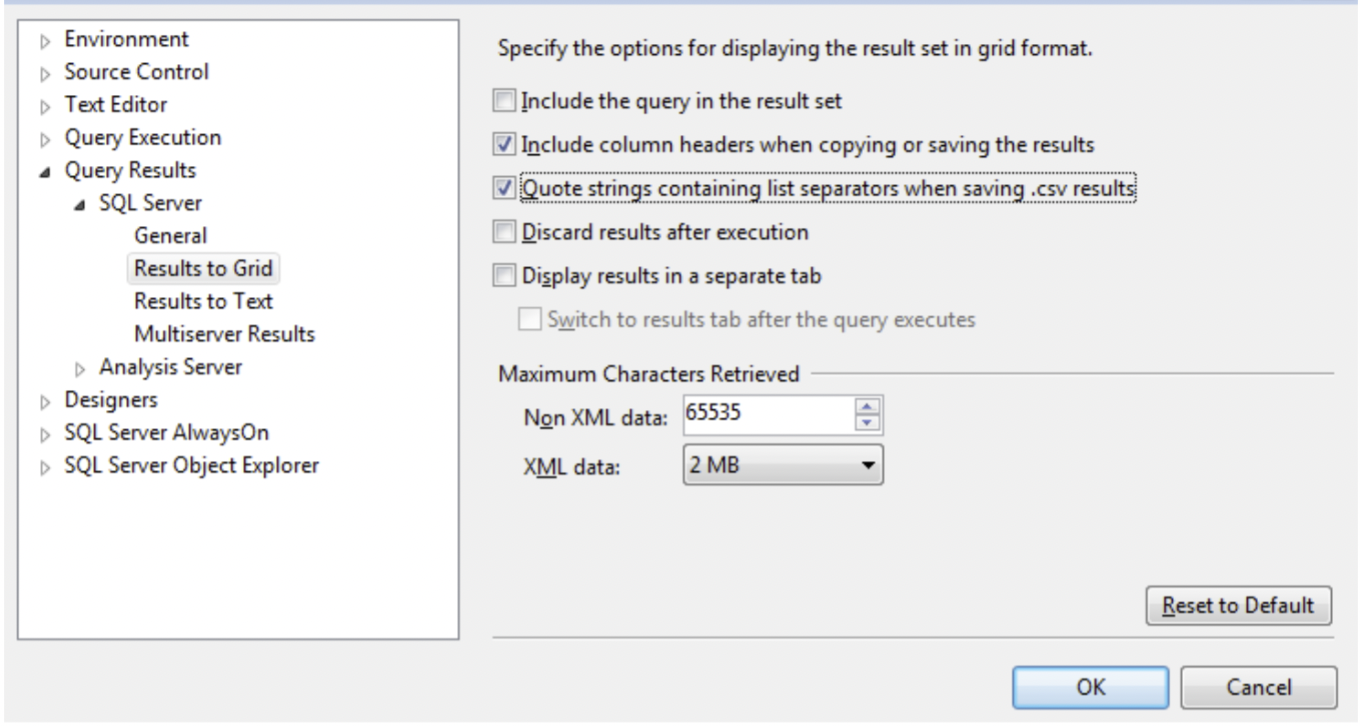
When saving the file, please use the following naming convention:
- "sccm_sim_inventory" for the SIM inventory query
The exported CSV is uploaded directly through the SIM interface — no further editing required.
Licenseware Query for SIM
This single query joins the SCCM hardware and software inventory views and projects all eleven SIM template columns in one pass.
Copy/Paste the following script in SCCM to extract the inventory in the format required by SIM.
-- SCCM SIM INVENTORY
-- Populates the Licenseware Software Inventory Manager (SIM) template by
-- joining SCCM hardware inventory, Add/Remove Programs, and processor data.
-- Output columns map 1:1 to the SIM template columns.
-- https://licenseware.io

WITH processor AS (
    -- Collapse multiple CPU rows per device to a single representative row
    SELECT
        ResourceID,
        MAX(Name0)            AS cpu_model,
        MAX(NumberOfCores0)   AS number_of_cores
    FROM v_GS_PROCESSOR
    GROUP BY ResourceID
)
SELECT DISTINCT
    ISNULL(SYS.Name0, '')                                       AS device_name,
    ISNULL(SYS.Top_Console_User0, '')                           AS user_name,
    ISNULL(ARP.Publisher0, '')                                  AS vendor_name,
    ISNULL(REPLACE(ARP.DisplayName0, '''', ''), '')             AS product_name,
    ISNULL(ARP.Version0, '')                                    AS product_version,
    CASE
        WHEN CS.Manufacturer0 IN (
            'VMware, Inc.', 'VMware',
            'Microsoft Corporation',
            'Xen', 'innotek GmbH',
            'QEMU', 'Red Hat',
            'Parallels Software International Inc.',
            'Nutanix', 'Bochs',
            'Google'
        )
        OR CS.Model0 LIKE '%Virtual%'
        OR CS.Model0 LIKE '%VMware%'
            THEN 'Virtual'
        WHEN CS.Manufacturer0 IS NULL AND CS.Model0 IS NULL
            THEN ''
        ELSE 'Physical'
    END                                                         AS device_type,
    ISNULL(CS.Manufacturer0, '')                                AS manufacturer,
    ISNULL(CS.Model0, '')                                       AS model,
    ISNULL(PROC.cpu_model, '')                                  AS cpu_model,
    CONVERT(VARCHAR(20), ISNULL(CS.NumberOfProcessors0, ''))    AS number_of_processors,
    CONVERT(VARCHAR(20), ISNULL(PROC.number_of_cores, ''))      AS number_of_cores
FROM
    v_R_System AS SYS
    INNER JOIN v_Add_Remove_Programs AS ARP
        ON SYS.ResourceID = ARP.ResourceID
    LEFT JOIN  v_GS_COMPUTER_SYSTEM  AS CS
        ON SYS.ResourceID = CS.ResourceID
    LEFT JOIN  processor             AS PROC
        ON SYS.ResourceID = PROC.ResourceID
WHERE
    SYS.Active0   <> 0
    AND SYS.Obsolete0 <> 1
    AND ISNULL(ARP.DisplayName0, '') <> ''
ORDER BY
    device_name,
    vendor_name,
    product_name,
    product_version;
The output will contain the following column headers (in this order), matching the SIM template exactly:
device_name,
user_name,
vendor_name,
product_name,
product_version,
device_type,
manufacturer,
model,
cpu_model,
number_of_processors,
number_of_cores
ℹ Info - device_name, vendor_name and product_name are required. All other columns are optional but populated automatically where SCCM has captured the data. - device_type is derived from the device manufacturer/model and resolves to Virtual for common hypervisor signatures (VMware, Hyper-V, Xen, KVM/QEMU, VirtualBox, Parallels, Nutanix AHV, Google) and Physical otherwise. |
|---|
Optional adjustments
- Last-logged-on user instead of primary user: replace
SYS.Top_Console_User0withSYS.User_Name0.