
Wiz
Wiz is an API integration. Connect it before you export a file.
Create credentials in Wiz
Section titled “Create credentials in Wiz”In Wiz, open Settings, then Access Management, then Service Accounts. Add a service account of type Custom Integration (GraphQL API). Grant read scopes only. Copy the client ID and the client secret. The secret is shown once.
The API endpoint URL is the tenant GraphQL address. Wiz shows it under tenant info. See the Wiz API reference.
Connect in Licenseware
Section titled “Connect in Licenseware”- Open Datasources from the sidebar and click Wiz.
- Click Connect. Documentation is at the top right of the source page.
- Fill the required fields. Each one is marked with *.
- API Endpoint URL. The placeholder is
https://api.us17.app.wiz.io/graphql. - Client ID
- Client Secret
- API Endpoint URL. The placeholder is
- Verify connection and Save credentials stay disabled until every required field is filled. Click Verify connection first, then Save credentials.
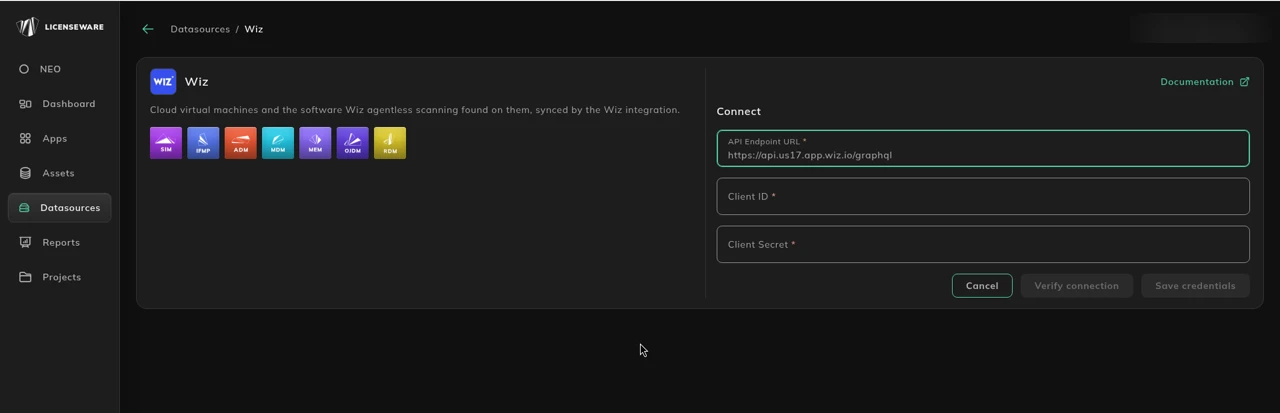
See Data sources for how to check a connection.
If you can’t connect
Section titled “If you can’t connect”Export the inventory from Wiz as CSV, with device name, software name, version and publisher, and upload it to the SIM template.