
Microsoft System Center (SCCM)
Run the Licenseware queries against the Microsoft System Center Configuration Manager (SCCM) database, then save and upload the results.
Microsoft SCCM has a SQL Server DB component that stores all the data collected by SCCM. To query the DB, you need:
- Install SQL Server Management Studio (SSMS)
- Make sure that you have access to the SCCM DB
Once the above requirements are satisfied, you can execute the Licenseware Queries for Microsoft SCCM. To do that:
- Open SQL Server Management Studio
- Logon using an account that has rights
- On the left, expand Database and select your SCCM Database. The SCCM database is the one named CM_XXX
- Right-click the database and select New Query
- In the Query pane, enter the SQL queries from the sections below (code panes)
- Hit the Execute button or hit the F5 key
- Your results show in the bottom pane
You need to execute each query, one by one. Once a query has been executed you’ll be able to export it as CSV.
Right-click on the Results tab
Save Results As…
Select CSV
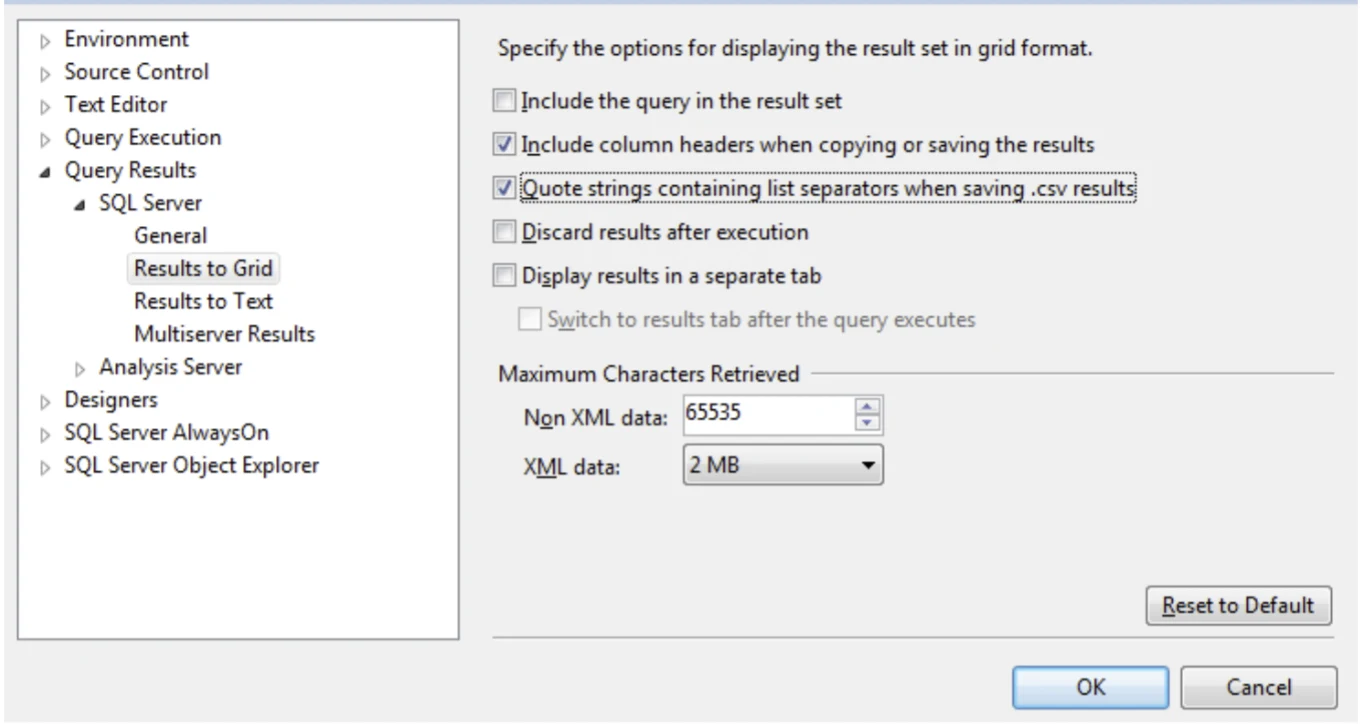
Important: in Tools > Options > Query Results > SQL Server > Results to Grid, tick Include column headers when copying or saving the results and Quote strings containing list separators when saving .csv results.
Save the files with these names:
- “sccm_software_inventory” for the software inventory query;
- “sccm_installed_software” for the installed software query;
- “sccm_hardware_inventory” for the hardware query;
Files with other names are ignored: they fail the first data validation step.
Licenseware Queries for Microsoft SCCM
Section titled “Licenseware Queries for Microsoft SCCM”Use the following queries to extract the hardware and software data required for analysis.
SCCM Hardware Inventory
Section titled “SCCM Hardware Inventory”Copy/Paste the following script in SCCM to extract the relevant hardware data.
-- SCCM HARDWARE INVENTORY-- collects hardware inventory from SCCM-- output data can be processed with the Licenseware Infrastructure Mapper (IFMP) App-- https://licenseware.io
WITH hardware_inventory AS (  SELECT    ROW_NUMBER() OVER (      PARTITION BY        [device_name]      ORDER BY        [creation_date0]      DESC    ) AS r,    *  FROM    (      SELECT        creation_date0,        CONVERT(          varchar,          (SYS.ResourceID)        ) AS device_key,        (SYS.Name0) AS [device_name],        (          ISNULL(SYS.Client0, 0)        ) AS [has_client],        (          CASE IsNull(OPSYS.CSDVersion0, '') WHEN '' THEN ISNULL(OPSYS.Caption0, '') + ' ' + ISNULL(OPSYS.Version0, '') ELSE ISNULL(OPSYS.Caption0, '') + ' ' + ISNULL(OPSYS.Version0, '') + ' (' + ISNULL(OPSYS.CSDVersion0, '') + ')' END        ) AS [os],        (          ISNULL(SED.Manufacturer0, '')        ) AS device_manufacturer,        (          ISNULL(SED.Model0, '')        ) AS device_model,        (          ISNULL(GSSE.SMBIOSAssetTag0, '')        ) AS [asset_tag],        (          CONVERT(            varchar(20),            CASE CONVERT(              VarChar(20),              ISNULL(SED.NumberOfProcessors0, '0')            ) WHEN '0' THEN '' ELSE CONVERT(              varchar(20),              SED.NumberOfProcessors0            ) END          )        ) AS [number_of_processors],        (          CASE ISNULL(GSSE.SerialNumber0, '') WHEN 'Not Available' THEN '' WHEN 'NONE' THEN '' WHEN 'To Be Filled By O.E.M.' THEN '' ELSE ISNULL(GSSE.SerialNumber0, '') END        ) AS [serial_number],        (          ISNULL(PROCESSOR.Manufacturer0, '')        ) AS [processor_manufacturer],        (          ISNULL(PROCESSOR.Name0, '')        ) AS [processor_model],        (          ISNULL(            SYS.Resource_Domain_OR_Workgr0,            ''          )        ) AS [domain],        (          ISNULL(PROCESSOR.NumberOfCores0, '')        ) AS [number_of_cores],        PROCESSOR.IsHyperthreadCapable0 As [ht_capable],        PROCESSOR.IsHyperthreadEnabled0 As [ht_enabled],        (          ISNULL(SED.SystemType0, '')        ) AS [platform],        (          CASE ISNULL(SED.Manufacturer0, '0') WHEN 'VMware, Inc.' THEN '1' WHEN 'Microsoft Corporation' THEN '1' ELSE '0' END        ) AS [virtual_flag]      FROM        v_R_System SYS        LEFT JOIN v_GS_OPERATING_SYSTEM OPSYS ON SYS.ResourceID = OPSYS.ResourceID        LEFT JOIN v_RA_System_IPAddresses IPA ON SYS.ResourceID = IPA.ResourceID        LEFT JOIN v_RA_System_MACAddresses MAC ON SYS.ResourceID = MAC.ResourceID        LEFT JOIN v_GS_COMPUTER_SYSTEM SED ON SYS.ResourceID = SED.ResourceID        LEFT JOIN v_GS_SYSTEM_ENCLOSURE GSSE ON SYS.ResourceID = GSSE.ResourceID        LEFT JOIN v_RA_System_SystemOUName SYSOU ON SYS.ResourceID = SYSOU.ResourceID        LEFT JOIN v_GS_PROCESSOR PROCESSOR ON SYS.ResourceID = PROCESSOR.ResourceID      WHERE        (          SYS.Active0 <> 0          AND SYS.Obsolete0 <> 1        )    ) AS x)SELECT  device_key,  [device_name],  [has_client],  [os],  device_manufacturer,  device_model,  [asset_tag],  [number_of_processors],  [serial_number],  [processor_manufacturer],  [processor_model],  [domain],  [number_of_cores],  [ht_capable],  [ht_enabled],  [platform],  [virtual_flag]FROM  hardware_inventoryWHERE  r = 1
The output should contain as a minimum the following column headers (in this order):
| ℹ Info - device_key is a unique identifier for a given device (virtual or physical). |
device_key,device_name,os,device_manufacturer,device_model,asset_tag,number_of_processors,serial_number,processor_manufacturer,processor_model,domain,number_of_cores,ht_capable,ht_enabled,platform,virtual_flagSome columns may be empty but keeping this format is required for the validation template. As a minimum, the following columns should be populated device_key, device_name, os. For best results, the more data the better.
SCCM Software Inventory
Section titled “SCCM Software Inventory”Copy/Paste the following script in SCCM to extract the relevant software inventory data.
-- SCCM SOFTWARE INVENTORY-- collects all software inventory from Add Remove Programs-- https://licenseware.io
 SELECT DISTINCT  isnull(Publisher0,'') + '_' + isnull(Replace(DisplayName0,'''',''),'') + '_' + isnull(version0, '') AS software_key,  isnull(Publisher0,'') AS software_publisher,  isnull(Replace(DisplayName0,'''',''),'') AS software_name,  isnull(version0, '') AS version FROM  v_Add_Remove_Programs ORDER BY  software_key
The output should contain as a minimum the following column headers (in this order):
| ℹ Info - software_key is a unique identifier for a given software product or product component. |
software_key,
software_publisher,
software_name,
version
Some columns may be empty but keeping this format is required for the validation template. As a minimum, the following columns should be populated software_key and software_name. For best results, the more data the better.
SCCM Installed Software
Section titled “SCCM Installed Software”Copy/Paste the following script in SCCM to extract a mapping of installed software per device.
-- SCCM INSTALLED SOFTWARE-- collects all installed software tiles for each device from Add Remove Programs-- https://licenseware.io
SELECT DISTINCT  ResourceID AS device_key,  isnull(Publisher0,'') + '_' + isnull(Replace(DisplayName0,'''',''),'') + '_' + isnull(version0, '') AS software_keyFROM  v_Add_Remove_ProgramsORDER BY  software_key,  device_key
The output should contain as a minimum the following column headers (in this order):
| ℹ Info - device_key is a unique identifier for a given device (virtual or physical). - software_key is a unique identifier for a given software product or product component. |
device_key,
software_key
Both columns are mandatory and must contain data.
Using a template
Section titled “Using a template”If your data has been exported from a different tool and/or is in an incompatible format, you may create a CVS template.
You’ll need to create 3 CSV files using this naming convention:
- “sccm_software_inventory” for the software inventory query;
- “sccm_installed_software” for the installed software query;
- “sccm_hardware_inventory” for the hardware query;
These CSV files need to contain the following data attributes keeping to the format described in the sections below.
| ℹ Info - device_key is a unique identifier for a given device (virtual or physical). - software_key is a unique identifier for a given software product or product component. - these keys are required for mapping the installed software on each device. |
Hardware Inventory
Section titled “Hardware Inventory”The output should contain as a minimum the following column headers (in this order):
device_key,device_name,os,device_manufacturer,device_model,asset_tag,number_of_processors,serial_number,processor_manufacturer,processor_model,domain,number_of_cores,ht_capable,ht_enabled,platform,virtual_flagSome columns may be empty but keeping this format is required for the validation template. As a minimum, the following columns should be populated device_key, device_name, os. For best results, the more data the better.
Software Inventory
Section titled “Software Inventory”The output should contain as a minimum the following column headers (in this order):
software_key,
software_publisher,
software_name,
version
Some columns may be empty but keeping this format is required for the validation template. As a minimum, the following columns should be populated software_key and software_name. For best results, the more data the better.
Installed Software
Section titled “Installed Software”The output should contain as a minimum the following column headers (in this order):
device_key,
software_key
Both columns are mandatory and must contain data.