
Lansweeper On-Prem export for LICENSEWARE SIM and MDM
Export installed software from Lansweeper On-Prem and format it into the SIM template for analysis and categorization.
Step 1: Access the Lansweeper report
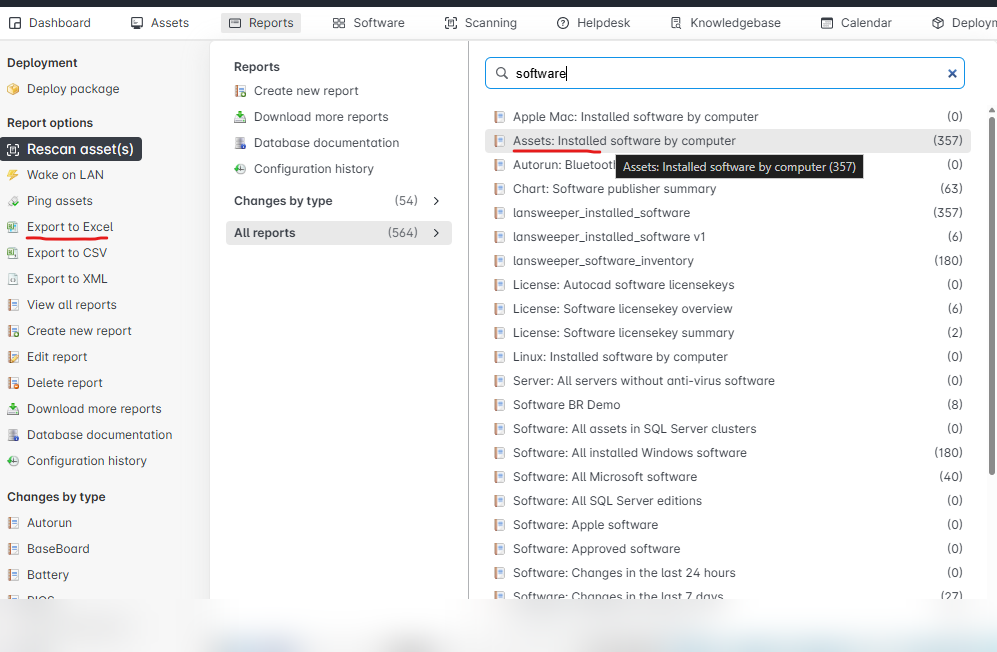
Section titled “Step 1: Access the Lansweeper report”- Open Lansweeper On-Prem and navigate to the Reports tab.
- In the search bar, type “software” to filter for relevant software inventory reports.
- Select the report titled “Assets: Installed software by computer”, this will give you a device-level breakdown of installed applications.
This is the most commonly used report for software inventory exports.
Step 2: Export the report
Section titled “Step 2: Export the report”Once the desired report is selected:
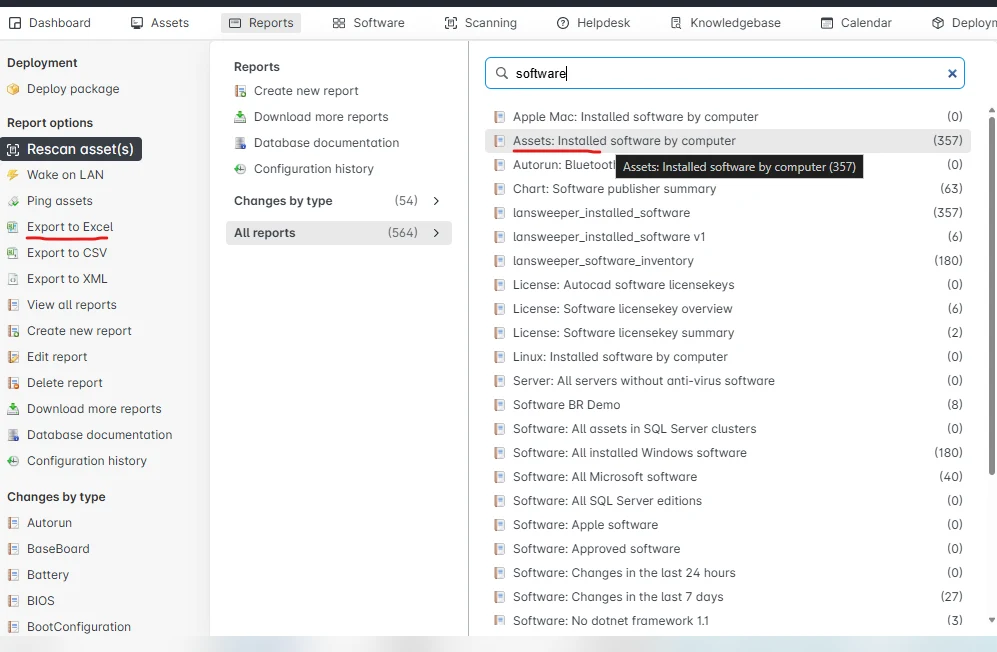
- Click Export to CSV or Export to Excel from the side menu.
- Save the file to your local machine, this will serve as your base for formatting into the Licenseware SIM template.
Ensure all relevant software fields (e.g. device name, software name, version) are included in the export.
Step 3: Format data for the SIM template
Section titled “Step 3: Format data for the SIM template”To ensure your data is correctly formatted for Licenseware’s SIM analysis, map your exported Lansweeper data into the standard template.
Follow the formatting instructions here: SIM Template Guide
This guide includes a downloadable template and detailed field requirements.
Step 4: Upload to Licenseware
Section titled “Step 4: Upload to Licenseware”- In Licenseware, open Datasources and click SIM - Template.
- Drag your formatted file (.csv) into the upload area, or click Upload.
- Check that it was processed in the source’s upload history.
Your SIM report will be generated shortly, showing recognized, unrecognized, and excluded products with categorization and normalization applied.
Queries for Microsoft Deployment Manager
Section titled “Queries for Microsoft Deployment Manager”Lansweeper On-Prem stores what it collects in SQL. For Microsoft Deployment Manager, save each query under the title below and export the result.
lansweeper_hardware_inventoryfor the hardware querylansweeper_software_inventoryfor the software inventory querylansweeper_installed_softwarefor the installed software query
SELECT DISTINCT tblassets.AssetID AS SoftwareAssetID, tblassets.AssetName AS AssetName, COALESCE( tblOperatingsystem.Caption, tblLinuxSystem.OperatingSystem ) AS OperatingSystem, tblassetcustom.Manufacturer AS Manufacturer, tblComputersystem.Model AS Model, tblassetcustom.SystemSKU AS SystemSKU, tblassets.NrProcessors AS NrProcessors, tblassetcustom.Serialnumber AS Serialnumber, COALESCE( tblProcessor.Manufacturer, tblLinuxProcessors.Manufacturer ) AS ProcessorManufacturer, COALESCE(tblProcessor.Caption, tblLinuxProcessors.Family) AS ProcessorModel, tblassets.Domain AS Domain, tblProcessor.NumberOfCores AS NumberOfCores, CASE WHEN tblProcessor.NumberOfLogicalProcessors / tblProcessor.NumberOfCores = 2 THEN 1 ELSE 0 END AS HyperThreading, tblComputersystem.SystemType AS SystemType, CASE WHEN tblassets.AssetID NOT IN ( SELECT tblHyperVGuest.AssetID FROM tblHyperVGuest ) AND tblassets.AssetID NOT IN ( SELECT tblVmwareGuest.AssetID FROM tblVmwareGuest ) AND tblassets.AssetID NOT IN ( SELECT tblCitrixGuest.AssetID FROM tblCitrixGuest ) THEN 0 ELSE 1 END AS VirtualFlagFROM tblassets LEFT JOIN tblassetcustom ON tblassets.AssetID = tblassetcustom.AssetID LEFT JOIN tsysassettypes ON tsysassettypes.AssetType = tblassets.Assettype LEFT JOIN tblProcessor ON tblassets.AssetID = tblProcessor.AssetID LEFT JOIN tblLinuxProcessors ON tblassets.AssetID = tblLinuxProcessors.AssetID LEFT JOIN tblOperatingsystem ON tblassets.AssetID = tblOperatingsystem.AssetID LEFT JOIN tblComputersystem ON tblassets.AssetID = tblComputersystem.AssetID LEFT JOIN tblHyperVGuest ON tblassets.AssetID = tblHyperVGuest.AssetID LEFT JOIN tblVmwareGuest ON tblassets.AssetID = tblVmwareGuest.AssetID LEFT JOIN tblCitrixGuest ON tblassets.AssetID = tblCitrixGuest.AssetID LEFT JOIN tblLinuxSystem ON tblassets.AssetID = tblLinuxSystem.AssetID LEFT JOIN tblLinuxBios ON tblassets.AssetID = tblLinuxBios.AssetIDWHERE tblassetcustom.State = 1 AND tblassets.Assettype = -1Name that report lansweeper_hardware_inventory.
SELECT DISTINCT CONCAT(tblSoftwareUni.SoftwarePublisher, '_', tblSoftwareUni.softwareName, '_', tblSoftware.softwareVersion) AS SoftwareKey, tblSoftwareUni.SoftwarePublisher AS SoftwarePublisher, tblSoftwareUni.softwareName AS softwareName, tblSoftware.softwareVersion AS softwareVersionFROM tblSoftware LEFT JOIN tblSoftwareUni ON tblSoftwareUni.SoftID = tblSoftware.softIDName that report lansweeper_software_inventory.
SELECT DISTINCT tblSoftware.AssetID AS SoftwareAssetID, CONCAT(tblSoftwareUni.SoftwarePublisher, '_', tblSoftwareUni.softwareName, '_', tblSoftware.softwareVersion) AS SoftwareKey, tblAssets.AssetID AS AssetIDFROM tblSoftware LEFT JOIN tblSoftwareUni ON tblSoftwareUni.SoftID = tblSoftware.softID LEFT JOIN tblAssets ON tblAssets.AssetID = tblSoftware.AssetIDWHERE tblAssets.Assettype = -1Name that report lansweeper_installed_software.