
Hyper-V script
The Hyper-V script collects your Hyper-V hosts, failover clusters and virtual machines, and how they relate to each other, in the format Infrastructure Mapper (IFMP) expects. It reads everything from the host itself, so it needs no credentials for the guest VMs.
Download Get-HyperVInventory.ps1
You can also read the full script at the end of this page.
What it collects
Section titled “What it collects”| Device type | What’s recorded |
|---|---|
| Physical | Each Hyper-V host: name, manufacturer and model, CPU model, processors, cores and threads, and its OS |
| Virtual | Each VM: name, guest OS, and its virtual processors |
| Cluster | The failover cluster, with the combined processors, cores and threads of its hosts |
It also records the relationships between them: each VM belongs to its host, and each host to its cluster.
The guest OS comes from Hyper-V’s Data Exchange integration service, so a VM’s OS is only read when the VM is running with Data Exchange enabled. Linux guests also need hv_kvp_daemon. The script lists any VMs it couldn’t read when it finishes.
Run the script
Section titled “Run the script”Copy
Get-HyperVInventory.ps1to a Hyper-V host.On a failover cluster, run it once on any node: it collects every node that is Up in the same run. For standalone hosts, run it once on each host.
Open PowerShell as administrator and run:
Terminal window .\Get-HyperVInventory.ps1To save the files somewhere other than the current folder, add
-OutputFolder:Terminal window .\Get-HyperVInventory.ps1 -OutputFolder C:\TempTo collect only the host you’re on, even if it’s in a cluster, add
-StandaloneOnly.When it finishes, the script shows how many devices and relationships it found and writes two files:
IFMP_Devices.csv: one row per host, VM and cluster.IFMP_Relationships.csv: which VM runs on which host, and which host belongs to which cluster.
If it warns that some VMs returned no guest OS data, their OS is set to Other. Start those VMs with Data Exchange enabled and run the script again, or fill in
operating_system_captionandoperating_system_typeyourself.
Upload to Infrastructure Mapper
Section titled “Upload to Infrastructure Mapper”The columns in both files match the IFMP template, so you copy them into it and upload the template.
In Licenseware, open Datasources and click IFMP - Template.
Click Download Template.
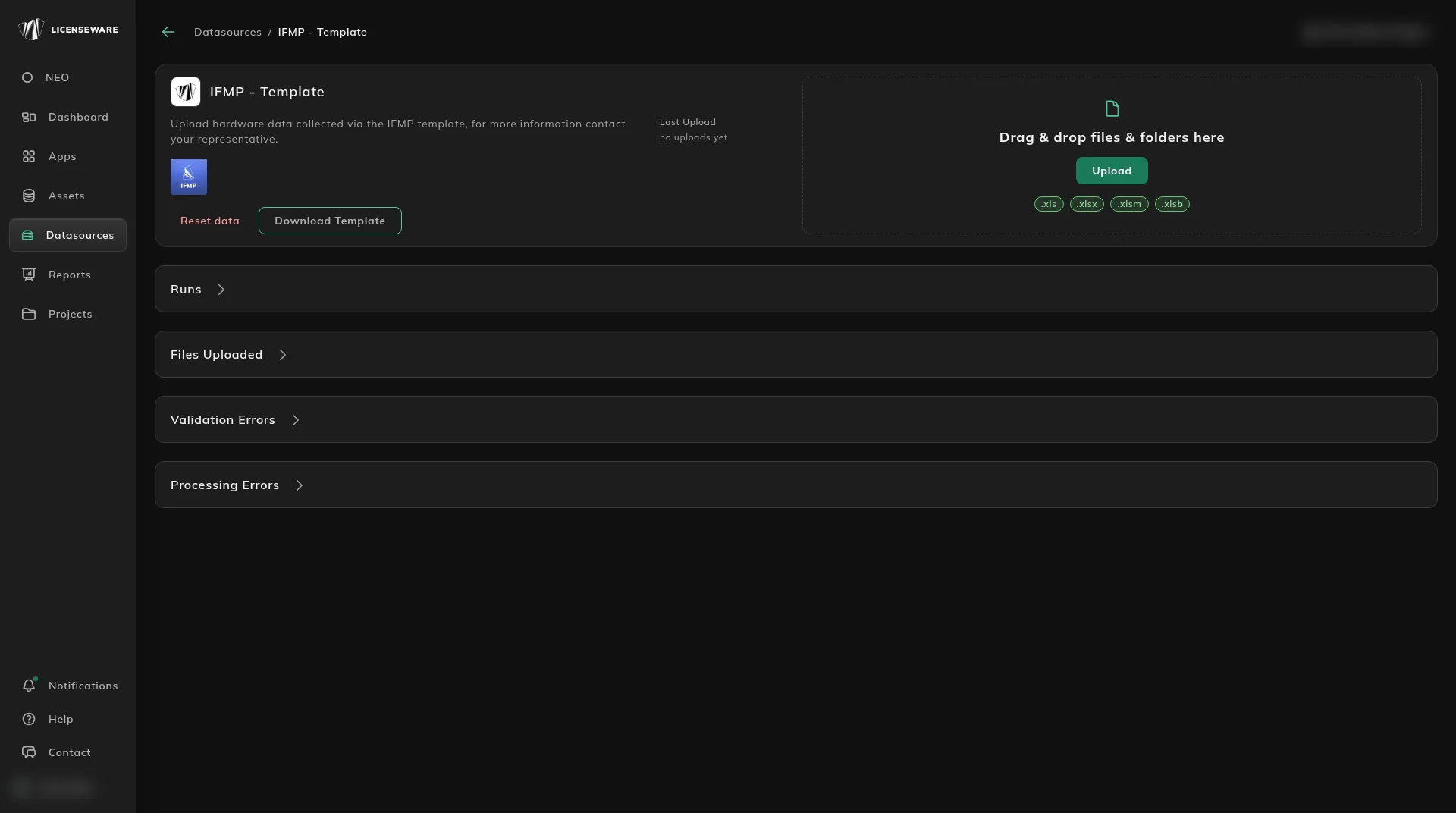
Fill in the template’s two tabs, below DATA LINES TO BE IMPORTED:
- Devices: paste the rows from
IFMP_Devices.csv. - Relationships: paste the rows from
IFMP_Relationships.csv.
Remove the template’s example rows, then save it. See Infrastructure template for more on the two tabs.
- Devices: paste the rows from
Back on IFMP - Template, drag the completed template onto the page or click Upload. It accepts
.xls,.xlsx,.xlsmand.xlsbfiles.Check the result in Runs and Files Uploaded. If anything in the file couldn’t be imported, it’s listed under Validation Errors or Processing Errors.
The script
Section titled “The script”<#.SYNOPSIS Collects Hyper-V hosts, VMs and relationships in Licenseware IFMP format.
.DESCRIPTION Run on any Hyper-V host (as administrator). If the host is part of a failover cluster, every node that is Up is collected in one run, so run it once per cluster (or once per standalone host).
Output (UTF-8 CSV, column order matches the IFMP template): IFMP_Devices.csv name, device_type, virtualization_type, capped, cpu_model, manufacturer, model, operating_system_caption, operating_system_type, total_number_of_processors, total_number_of_cores, total_number_of_threads, source_system_id, vcenter_name IFMP_Relationships.csv from_device, relationship_type, to_device
Guest OS is read from Hyper-V KVP integration data, so no guest credentials are needed. It requires the VM to be running with Data Exchange (KVP) enabled (Linux guests need hv_kvp_daemon). VMs without KVP data are listed at the end.
.PARAMETER OutputFolder Folder for the CSV files. Defaults to the current folder.
.PARAMETER StandaloneOnly Collect only the local host, even if it is clustered.#>[CmdletBinding()]param( [string]$OutputFolder = (Get-Location).Path, [switch]$StandaloneOnly)
$ErrorActionPreference = 'Stop'
$devices = [System.Collections.Generic.List[object]]::new()$relationships = [System.Collections.Generic.List[object]]::new()$noGuestData = [System.Collections.Generic.List[string]]::new()
function New-DeviceRow { param($Name, $DeviceType, $Capped, $CpuModel, $Manufacturer, $Model, $OsCaption, $OsType, $Processors, $Cores, $Threads, $SourceId) [pscustomobject][ordered]@{ name = $Name device_type = $DeviceType virtualization_type = 'Hyper-V' capped = if ($Capped) { 'TRUE' } else { 'FALSE' } cpu_model = $CpuModel manufacturer = $Manufacturer model = $Model operating_system_caption = $OsCaption operating_system_type = $OsType total_number_of_processors = $Processors total_number_of_cores = $Cores total_number_of_threads = $Threads source_system_id = $SourceId vcenter_name = $null }}
function Add-Relationship { param($From, $Type, $To) $relationships.Add([pscustomobject][ordered]@{ from_device = $From relationship_type = $Type to_device = $To })}
function Get-OsType { param([string]$Caption) if ([string]::IsNullOrWhiteSpace($Caption)) { return 'Other' } switch -Regex ($Caption) { 'Windows' { return 'Windows' } 'Linux|Red Hat|RHEL|CentOS|Ubuntu|Debian|SUSE|SLES|Oracle|Rocky|Alma|Fedora|Amazon' { return 'Linux' } 'Solaris|SunOS' { return 'Solaris' } 'AIX' { return 'AIX' } 'HP-UX' { return 'HP-UX' } default { return 'Other' } }}
function Get-GuestKvp { # Returns a hashtable of guest intrinsic KVP items (OSName, OSVersion, # FullyQualifiedDomainName, ...) or an empty hashtable if unavailable. param($CimSession, [string]$VmId) $data = @{} try { $vmCim = Get-CimInstance -CimSession $CimSession -Namespace 'root\virtualization\v2' ` -ClassName Msvm_ComputerSystem -Filter "Name='$VmId'" $kvp = Get-CimAssociatedInstance -CimSession $CimSession -InputObject $vmCim ` -ResultClassName Msvm_KvpExchangeComponent foreach ($item in $kvp.GuestIntrinsicExchangeItems) { $xml = [xml]$item $name = ($xml.INSTANCE.PROPERTY | Where-Object NAME -eq 'Name').VALUE $val = ($xml.INSTANCE.PROPERTY | Where-Object NAME -eq 'Data').VALUE if ($name) { $data[$name] = $val } } } catch { } return $data}
# ---- Determine scope: cluster nodes or local host ----$clusterName = $null$nodes = @($env:COMPUTERNAME)
if (-not $StandaloneOnly) { try { Import-Module FailoverClusters -ErrorAction Stop $cluster = Get-Cluster -ErrorAction Stop $clusterName = if ($cluster.Domain) { "$($cluster.Name).$($cluster.Domain)" } else { $cluster.Name } $allNodes = Get-ClusterNode -Cluster $cluster.Name $down = $allNodes | Where-Object State -ne 'Up' foreach ($d in $down) { Write-Warning "Cluster node $($d.Name) is $($d.State) and will not be collected." } $nodes = @($allNodes | Where-Object State -eq 'Up' | ForEach-Object Name) } catch { $clusterName = $null }}
$clusterCores = 0; $clusterThreads = 0; $clusterProcs = 0; $clusterCpuModels = @()
foreach ($node in $nodes) { Write-Host "Collecting $node ..." $isLocal = $node -eq $env:COMPUTERNAME $cim = if ($isLocal) { New-CimSession } else { New-CimSession -ComputerName $node }
try { # ---- HOST (Physical) ---- $cs = Get-CimInstance -CimSession $cim Win32_ComputerSystem $os = Get-CimInstance -CimSession $cim Win32_OperatingSystem $cpu = @(Get-CimInstance -CimSession $cim Win32_Processor) $prod = Get-CimInstance -CimSession $cim Win32_ComputerSystemProduct
$hostName = if ($cs.PartOfDomain) { "$($cs.DNSHostName).$($cs.Domain)" } else { $cs.DNSHostName } $cores = ($cpu | Measure-Object NumberOfCores -Sum).Sum $threads = ($cpu | Measure-Object NumberOfLogicalProcessors -Sum).Sum $cpuModel = ($cpu[0].Name -replace '\s+', ' ').Trim()
$devices.Add((New-DeviceRow -Name $hostName -DeviceType 'Physical' -Capped $true ` -CpuModel $cpuModel -Manufacturer $cs.Manufacturer -Model $cs.Model ` -OsCaption $os.Caption -OsType (Get-OsType $os.Caption) ` -Processors $cpu.Count -Cores $cores -Threads $threads -SourceId $prod.UUID))
if ($clusterName) { Add-Relationship -From $hostName -Type 'is child to' -To $clusterName $clusterCores += $cores; $clusterThreads += $threads; $clusterProcs += $cpu.Count $clusterCpuModels += $cpuModel }
# ---- VMs (Virtual) ---- $vms = if ($isLocal) { Get-VM } else { Get-VM -ComputerName $node } foreach ($vm in $vms) { $kvp = Get-GuestKvp -CimSession $cim -VmId $vm.VMId.Guid
$vmName = if ($kvp['FullyQualifiedDomainName']) { $kvp['FullyQualifiedDomainName'] } else { $vm.Name } $caption = $null if ($kvp['OSName']) { $caption = if ($kvp['OSVersion']) { "$($kvp['OSName']) $($kvp['OSVersion'])" } else { $kvp['OSName'] } } else { $noGuestData.Add("$($vm.Name) on $hostName (state: $($vm.State))") }
$devices.Add((New-DeviceRow -Name $vmName -DeviceType 'Virtual' -Capped $false ` -CpuModel $cpuModel -Manufacturer 'Microsoft Corporation' -Model 'Virtual Machine' ` -OsCaption $caption -OsType (Get-OsType $caption) ` -Processors 1 -Cores $vm.ProcessorCount -Threads $vm.ProcessorCount ` -SourceId $vm.VMId.Guid))
Add-Relationship -From $vmName -Type 'is child to' -To $hostName } } catch { Write-Warning "Failed to collect ${node}: $($_.Exception.Message)" } finally { Remove-CimSession $cim }}
# ---- CLUSTER row ----if ($clusterName) { $uniqueModels = @($clusterCpuModels | Sort-Object -Unique) $devices.Add((New-DeviceRow -Name $clusterName -DeviceType 'Cluster' -Capped $true ` -CpuModel ($uniqueModels -join '; ') -Manufacturer $null -Model $null ` -OsCaption $null -OsType 'Windows' ` -Processors $clusterProcs -Cores $clusterCores -Threads $clusterThreads -SourceId $null))}
# ---- Export ----$devicesPath = Join-Path $OutputFolder 'IFMP_Devices.csv'$relsPath = Join-Path $OutputFolder 'IFMP_Relationships.csv'$devices | Export-Csv $devicesPath -NoTypeInformation -Encoding UTF8$relationships | Export-Csv $relsPath -NoTypeInformation -Encoding UTF8
Write-Host "`nDevices: $($devices.Count) Relationships: $($relationships.Count)"Write-Host "Written: $devicesPath"Write-Host "Written: $relsPath"
if ($noGuestData.Count -gt 0) { Write-Warning "$($noGuestData.Count) VM(s) returned no guest OS data (set to 'Other'). Check they are running with Data Exchange enabled, or fill operating_system_caption/type manually:" $noGuestData | ForEach-Object { Write-Host " $_" }}