
Find unused software to reclaim
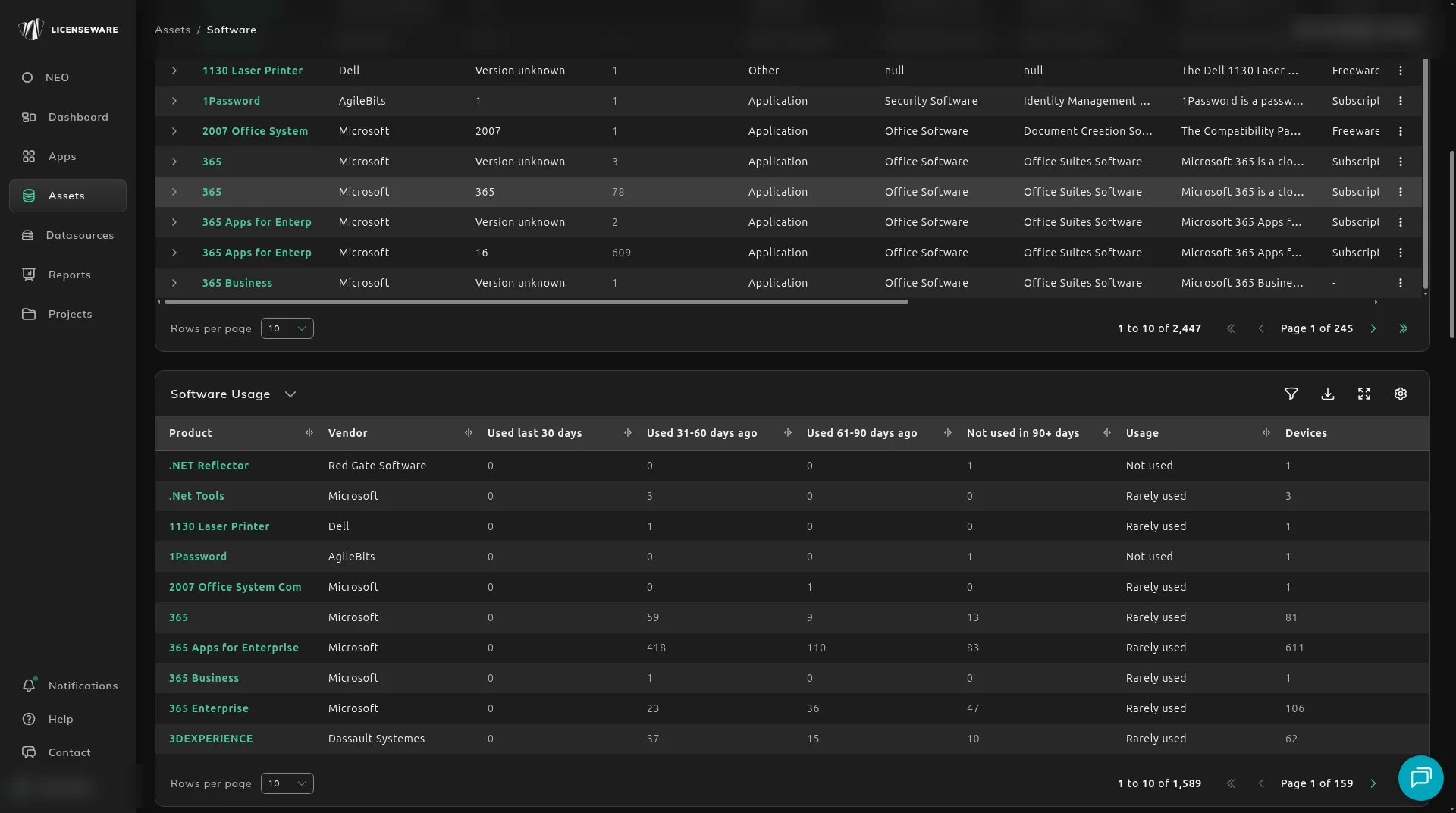
Use this when you are paying for software nobody has opened. The Collector meters when each product is actually run, and that usage fills the windows below, so you can see which products went quiet and reclaim the license or uninstall it before a renewal.
Where the usage comes from
Section titled “Where the usage comes from”The usage comes from the Collector. Every 240 minutes the agent reads execution history, such as last run time and run count on Windows and last-opened time on macOS. A discovery tool that only lists installs leaves Usage empty, so deploy the agent on every machine you want to meter. See Install Collector agents.
Open Software Usage
Section titled “Open Software Usage”- Click Assets, then Software.
- Scroll to Software Usage.
The buckets are exclusive. A device sits in one of them, not in every bucket it has passed through. The four counts should add up to Devices.
| Column | What it counts |
|---|---|
| Used last 30 days | Devices that used it in the last 30 days. |
| Used 31-60 days ago | Devices whose last use was 31 to 60 days ago. |
| Used 61-90 days ago | Devices whose last use was 61 to 90 days ago. |
| Not used in 90+ days | Devices with no use in the last 90 days. |
| Usage | A label such as Not used or Rarely used. |
| Devices | Devices with this product. |
Product and Vendor are the first two columns.
What to look at
Section titled “What to look at”Start with Not used in 90+ days and a Usage label of Not used. Those are the reclaim candidates. Rarely used is the next cut: still installed, barely launched.
A high Devices count with almost everything in Not used in 90+ days is a product you are carrying across the estate.
What to do next
Section titled “What to do next”If the product is paid, confirm the metric and price on See what’s paid vs free, then check the contract in License and Contracts Manager before you drop the quantity.
If it should never have counted, exclude it instead of treating it as waste. The exclusion changes what the Software Inventory report counts.