
What SIM does and when to use it
Software Inventory Manager (SIM) turns a raw inventory list into one software estate. It recognizes the product behind a messy install string, matches that product to a licensing model, and enriches it with vendor, category, cost and a paid or free flag.
Use it when you cannot answer a plain question from the discovery tool alone:
- What is actually installed, under one name, across every source?
- What is unused, and what could you reclaim?
- What is paid, what is free, and how is each product licensed?
- What is past support, and where do several tools do one job?
- Which installs never matched a product, and which records should stay out of the analysis?
Raw rows go in. Classified, costed data comes out. Categorizing products that do the same job is what makes a consolidation possible. That data is what the rest of the platform reads: License and Contracts Manager allocates against products SIM has recognized, and the vendor apps analyze the estate SIM has already cleaned up.
SIM can take any inventory source. An API such as Lansweeper is the usual path. A file only needs software name, version and vendor, on the SIM template. Filter the report by category and subcategory to see which applications do one job, which is the start of a consolidation or a vendor negotiation.
Connect an API integration first, from Data sources, including a source such as Red Hat Satellite when that is what you run. Deploy the Collector as well: it adds the usage behind Find unused software to reclaim, and covers machines no integration sees. A file or the SIM template covers a tool with no API. Licenseware normalizes and consolidates those inputs so the same product is one row, whichever tool collected it.
Where to go next
Section titled “Where to go next”| Question | Page |
|---|---|
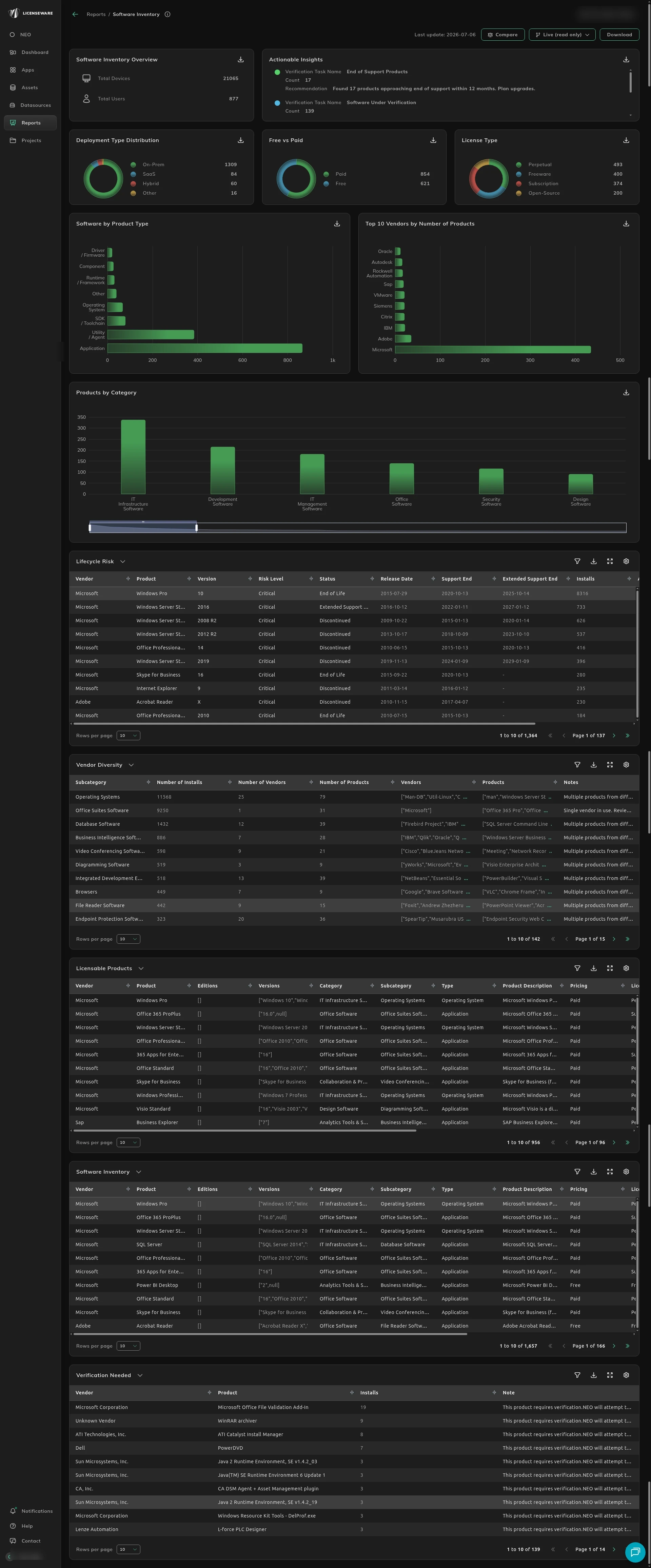
| What do the charts and tables mean? | Software Inventory report |
| What is nobody using? | Find unused software to reclaim |
| What do we pay for? | See what’s paid vs free |
| What is out of support? | Spot end-of-support software |
| Where do tools overlap? | Reduce overlapping tools |
| An install never matched, so the report is missing it | Map unmatched software to the right product |
| The classification or price on the report is wrong | Fix how a product is classified |
| Something should not count on the report | Exclude software from analysis |
Mapping, classification changes and exclusions are done on Assets, on the Software tab. They apply across the project, not only inside SIM. Each one changes what the Software Inventory report counts.
What the catalog adds
Section titled “What the catalog adds”The report classifies each recognized product with these fields.
| Field | What it holds |
|---|---|
| Life Cycle | Release date, discontinue date, and the end of mainstream and extended support. |
| Category | The function, such as IT infrastructure or security. Aligned to the G2 taxonomy. |
| Subcategory | The narrower class inside that category, such as database software or endpoint protection. Also G2. |
| License Type | Proprietary, open source, subscription or perpetual. |
| Estimate Cost | An approximate cost per license, where the catalog has one. |
Export Recognized, Excluded or Unrecognized to see the devices. Each export is one row per device, so you can see which machines have a product. The download behavior is on Using reports.
What SIM calculates
Section titled “What SIM calculates”- Paid and free software, with standard pricing where it is public.
- License discovery: paid licenses, on-premises or subscription products, and open source software.
- Categorization on a trusted software taxonomy, so several tools in one category can be standardized. Several PDF editors, for example, can be brought onto one company-wide product.
- Licensing metadata: metrics, license models, pricing and descriptions for the products it recognized.
- Continuous recognition: unrecognized software is recognized and added to the reports within 24 hours of the data arriving.
- Advanced license analysis: once the estate is rationalized in SIM, the vendor apps take the same products further, for Oracle, Microsoft, Adobe, Red Hat and the others.
Questions
Section titled “Questions”How long does recognition take? Unrecognized software is categorized within 24 hours.
What does Processing mean? The dynamic recognition service is still running on the unrecognized rows. The status updates on its own when that finishes. It finishes within 24 hours.
Can the catalog be enriched further? Publisher, edition and classification tags can be added to recognized software. Ask your Licenseware representative.
Can several inventories be combined? Yes. SIM merges sources such as Lansweeper, SCCM and BigFix, and deduplicates and normalizes the records where it can.
Does SIM measure usage? SIM shows installations per device from the source you gave it. Usage comes from a source that records it, such as the Collector, which meters when software was last run. See Find unused software to reclaim.
What about SaaS? The current model enriches locally installed applications, because version is required. Normalized SaaS data can be parsed by a separate model. That path is in closed preview. Ask your Licenseware representative.
Two NEO reports are written from this estate:
- App Rationalization & Consolidation for overlap and what to keep.
- Software Risk & Hygiene for end-of-life software, personal-use tools and shadow IT.
Start, or talk to us
Section titled “Start, or talk to us”Start free creates your account on the EU instance. For the US or AU instance, sign up at us.licenseware.io or au.licenseware.io. See pricing.