
Spot end-of-support software
Use this when you need the upgrade list, not another inventory export. End-of-support software is still installed, and the vendor has stopped patching it.
Spot end-of-support software
Start with the count
Section titled “Start with the count”- Open the Software Inventory report.
- In Actionable Insights, read End of Support Products.
The row has a count and a recommendation. The table underneath is where you work.
Read Lifecycle Risk
Section titled “Read Lifecycle Risk”Open Lifecycle Risk.

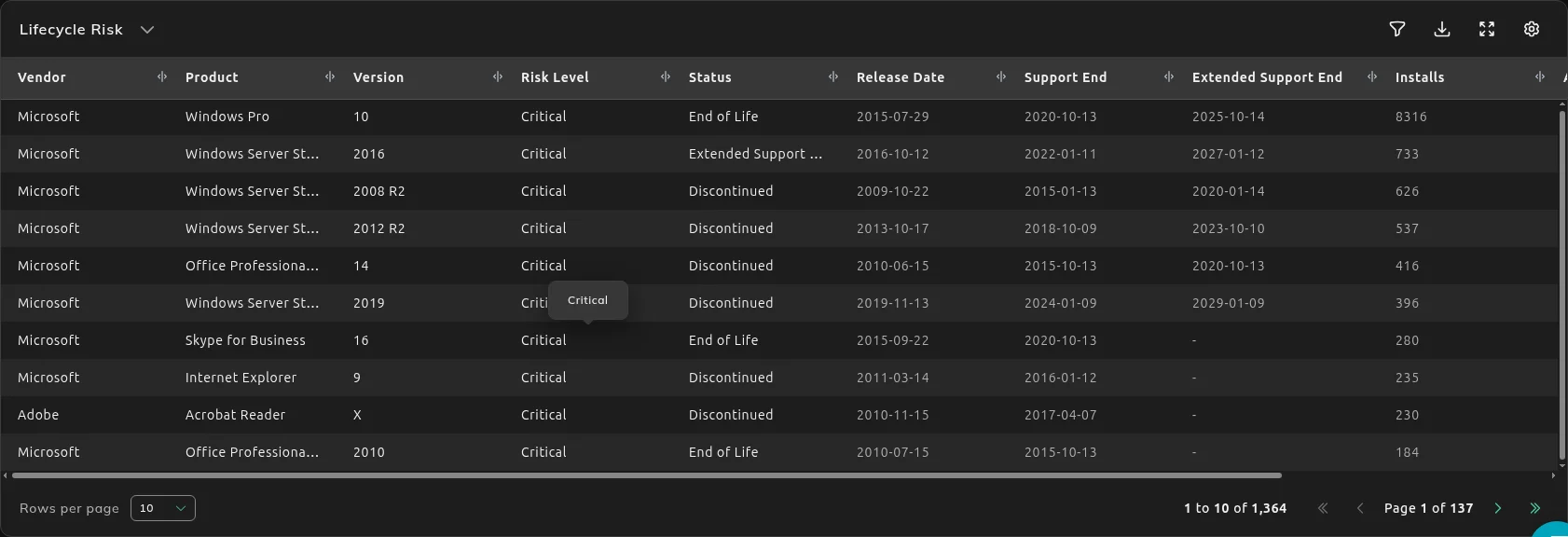
| Column | Use it for |
|---|---|
| Risk Level and Status | How urgent the version is. |
| Support End and Extended Support End | When standard support ends, and when extended support ends. |
| Installs | How many installs are on that version. |
| Action Required and Notes | What SIM suggests you do. |
Sort by Support End or filter Risk Level to get the versions that need a plan first.
What to do next
Section titled “What to do next”Software Risk & Hygiene writes this up as lifecycle and end-of-life exposure, including what expires this year and next.
If the product is under a contract, match it in License and Contracts Manager before you renew the version you are about to retire. Version on Lifecycle Risk is the version the report is counting.