
Connect AI providers
AI tools are bought per seat and per token, often from several vendors at once. Connect each provider and SIM shows who uses which tool, what it costs, and where seats sit unused, next to the rest of your software.
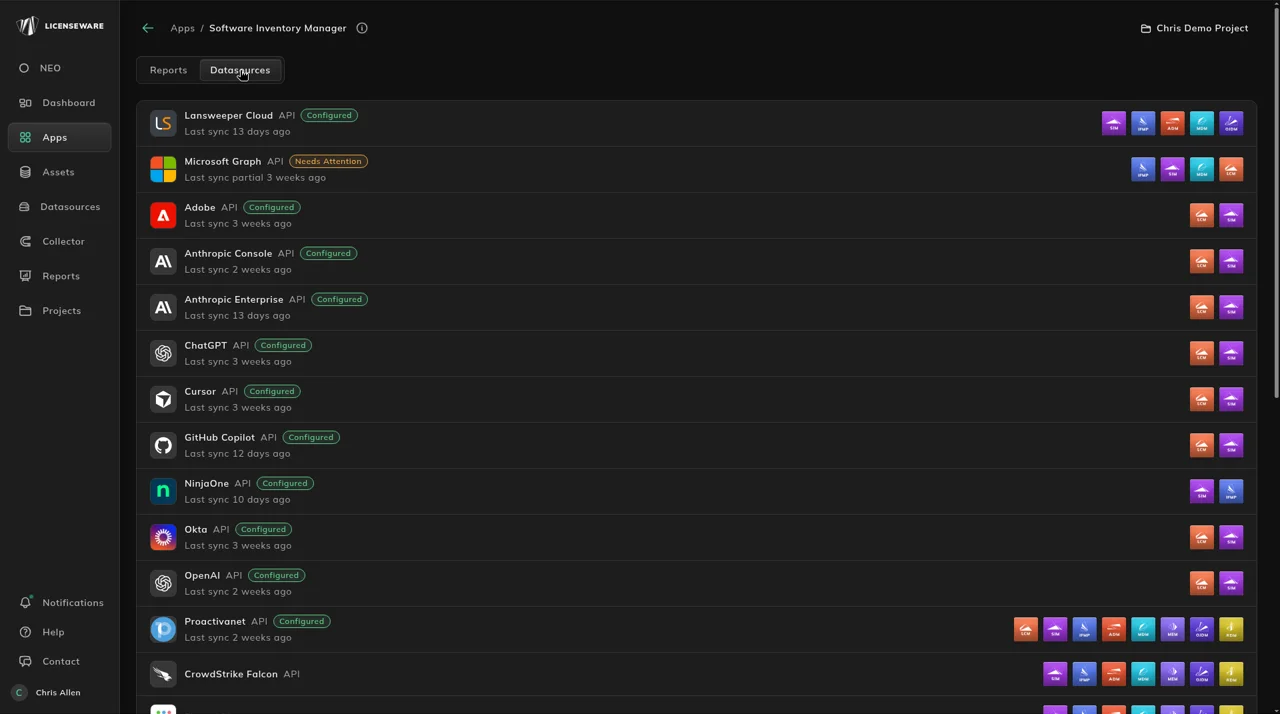
Where the AI providers live
Section titled “Where the AI providers live”Open Datasources in the sidebar and filter to API, or open Apps, then Software Inventory Manager, and click the Datasources tab. Each provider shows Configured or Needs Attention, when it last synced, and app chips for the apps it feeds: LCM and SIM for every AI provider.
Connect a provider
Section titled “Connect a provider”- Click the provider in Datasources.
- Enter its credentials. Each provider’s page, in the table below, lists the fields it needs.
- Click Verify Connection to check that Licenseware can connect with them.
- The provider then syncs on the schedule, Mon & Wed at 22:00 UTC. Click Sync Now to bring the data in straight away.
Sync history, errors and the other buttons are on Check and manage the connection.
The six AI providers
Section titled “The six AI providers”Some providers appear in the reports under a different name from the data source. This table is the mapping.
| Data source | Credentials | Name in the reports |
|---|---|---|
| Anthropic Console | API Key | Anthropic Console |
| Anthropic Enterprise | API Key | Claude Enterprise |
| ChatGPT | Admin API Key, Workspace ID, Organization | ChatGPT Enterprise |
| Cursor | Admin API Key | Cursor |
| GitHub Copilot | Access Token, Organizations | GitHub Copilot Business |
| OpenAI | Admin API Key | OpenAI API platform |
Where the data shows
Section titled “Where the data shows”- AI Usage: spend, tokens and adoption per tool, who holds more than one AI tool, and the seats nobody used in the last 28 days.
- SaaS Seats: each AI tool as a license, with its seats against real use, next to your other per-user SaaS licenses.
SaaS apps assigned through single sign-on come from Okta, also an API source on Datasources.