

Oracle Database Usage
Oracle Database Usage is the evidence behind the requirement: which edition is installed, and which options are used, historical, or still marked verify. An option you cannot explain is the one an audit will price.
Open it from Apps, then Oracle Database Manager, on the Reports tab.
At a glance
Section titled “At a glance”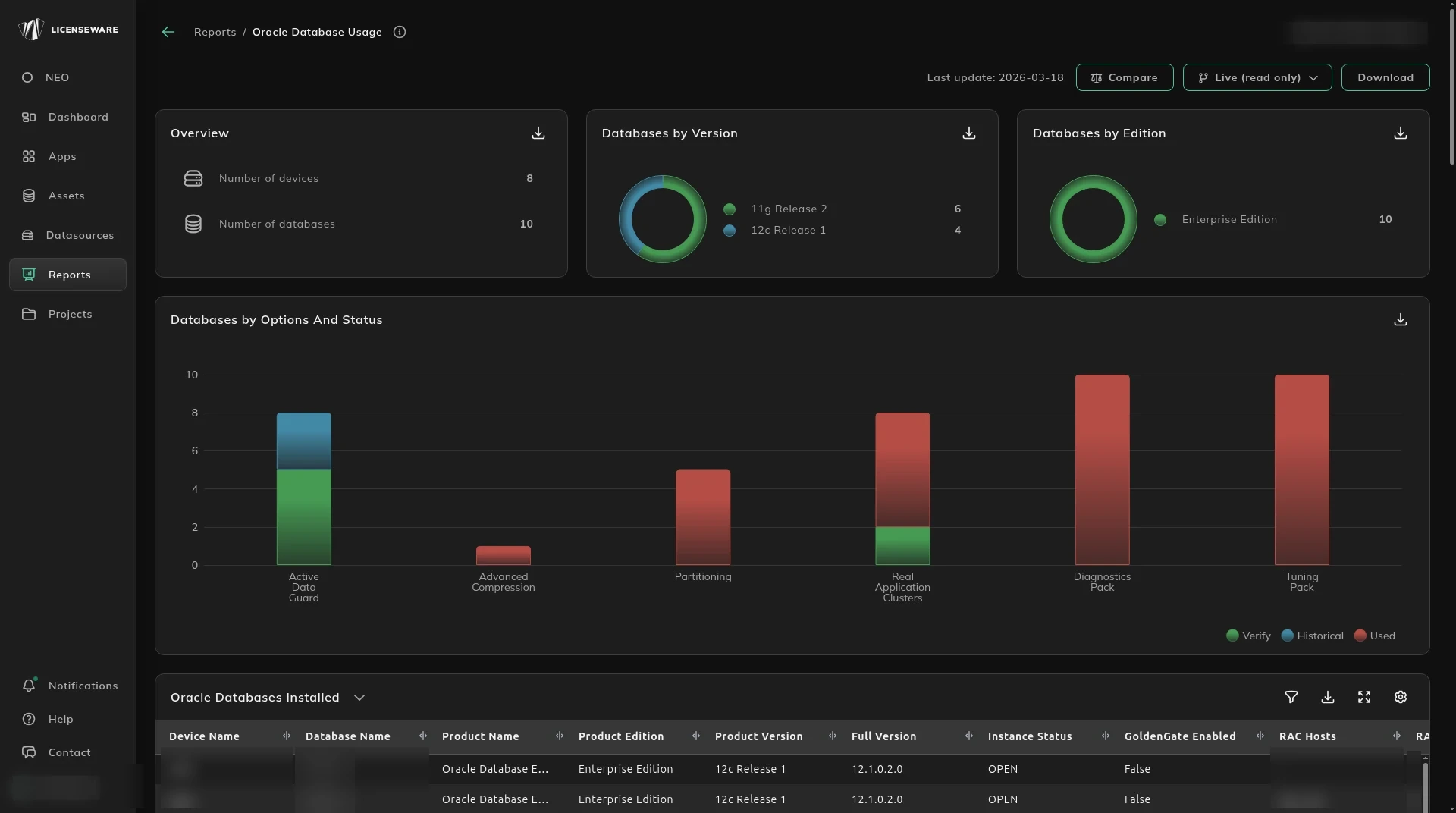
- Overview is the number of devices and databases.
- Databases by Version and Databases by Edition show what is installed. Enterprise Edition is not Standard Edition 2.
- Databases by Options And Status splits options such as Active Data Guard, Advanced Compression, Partitioning, Real Application Clusters, Diagnostics Pack and Tuning Pack into Used, Historical, Cloned, Verify and Not Used.
Which options are on
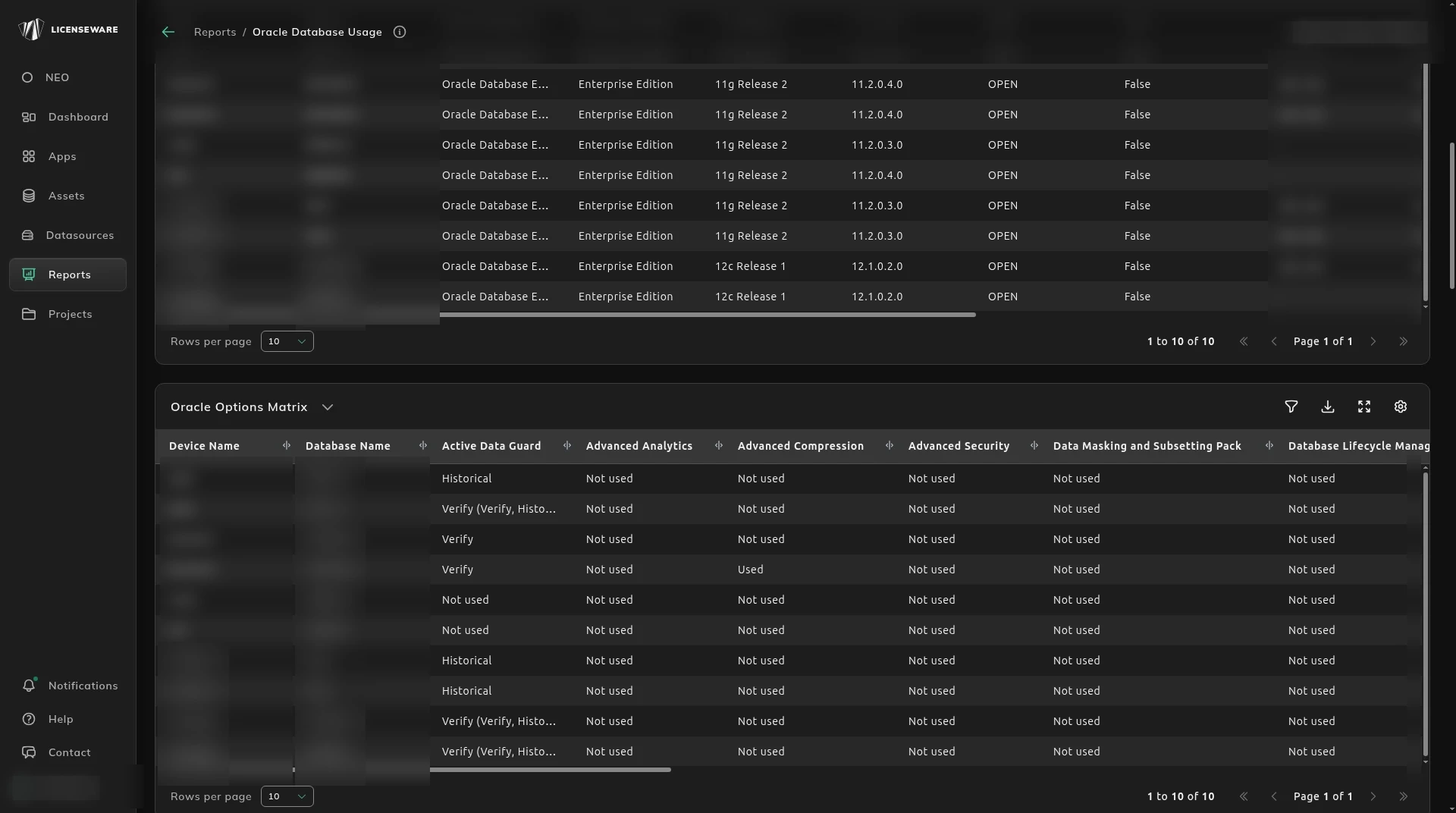
Section titled “Which options are on”Oracle Databases Installed is the same database list as the consolidated report: device, name, edition, version, status, and RAC.
Oracle Options Matrix is one column per option, including Diagnostics Pack, Tuning Pack, Partitioning, Multitenant, Real Application Clusters, Advanced Security, and Data Masking and Subsetting Pack. Each cell is one of the statuses above.
What each status means
Section titled “What each status means”The status says how the feature was seen. It is not, by itself, the license requirement. The consolidated report applies the licensing logic.
| Status | What it means |
|---|---|
| Used | The feature has been used in this environment. Usage is evidence. It does not by itself mean the feature must be licensed. |
| Historical | Not used in the past 90 days, and not in use now. Earlier use can still carry a licensing implication. |
| Cloned | The database has a duplicated DB ID, so it was likely cloned. Features or usage evidence on it may not be required. Review it. |
| Verify | The feature was detected and the usage is unclear. Someone has to confirm it. Until then the license requirement assumes the worst case: the feature was used on that database. |
| Not Used | There is no evidence the feature was used. |
Real Application Clusters is flagged as used only when the number of members is more than 1. RAC can be enabled on a single node, and that state is not treated as licensable.
Hover a result to read the Analysis Summary and the Detailed Analysis: the final status, the first and last usage dates, and the other flags that contributed. The evidence rows name the feature and the source file, how many times it was detected against the total samples, the licensing note, and the sample period.
Enterprise Manager packs
Section titled “Enterprise Manager packs”Databases managed through Oracle Enterprise Manager are listed with the pack that was opened, such as Diagnostics Pack or Tuning Pack, and whether access was agreed, by whom, and on what date. Opening a management pack can be licensable even when nobody meant to use it.
Sessions
Section titled “Sessions”The session list is who is connected: session id, username and schema, OS user, machine and terminal, dedicated or shared server, last call and last login, and the process and SQL action captured. Use it to see real activity, including a third party, against the features that are installed.
The cost of the options the consolidated report treats as licensable is on Oracle Database Consolidated.
Download on an aggregated table saves one row per device, with the user. See Using reports.