

Oracle Database Consolidated
Oracle Database Consolidated is the requirement: which databases are installed, which options drive a license, and the processor and Named User Plus cost of that use. A pack that is installed but not used is not the same requirement as a pack the database is running.
Open it from Apps, then Oracle Database Manager, on the Reports tab, or from Reports.
At a glance
Section titled “At a glance”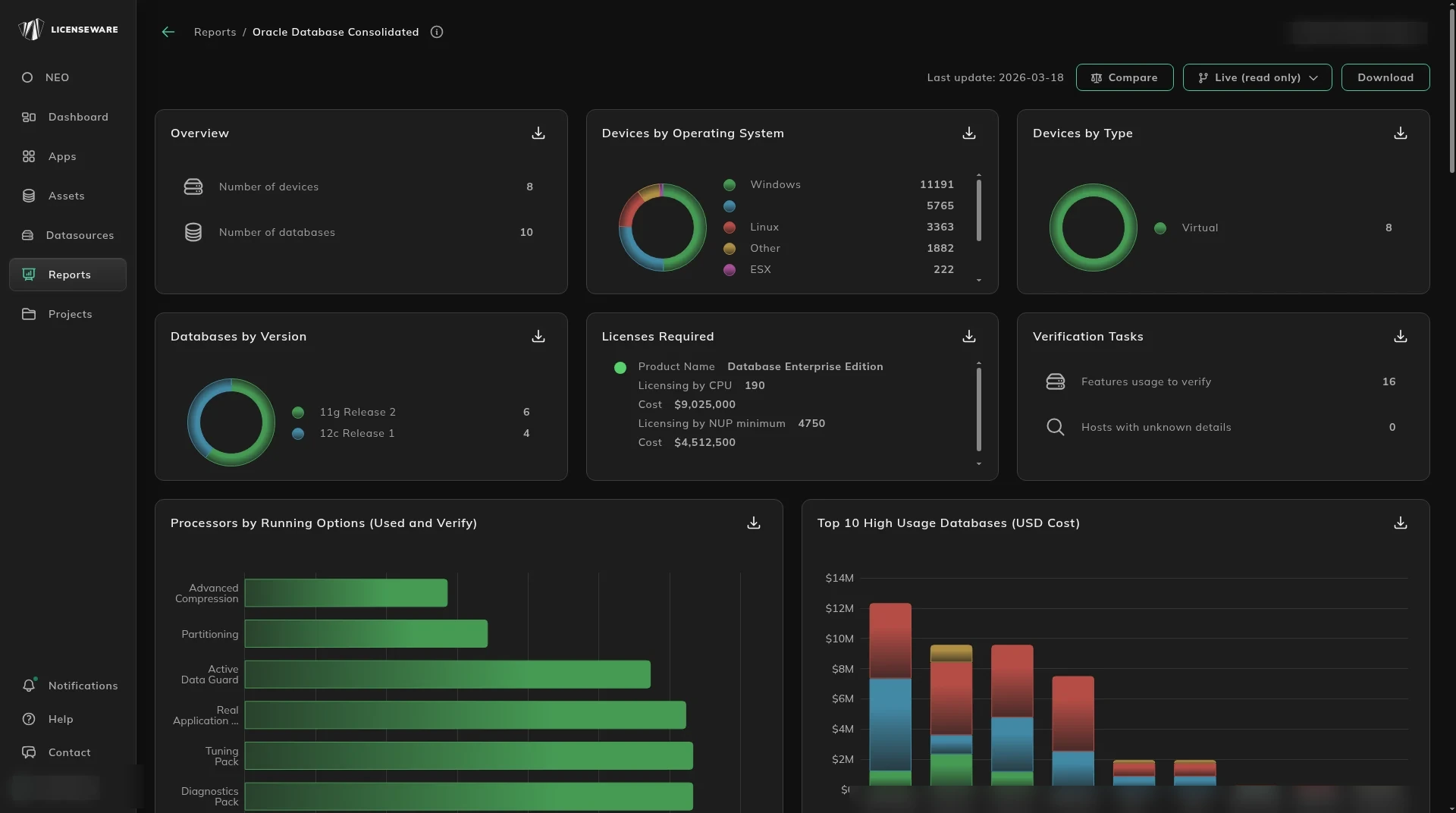
- Overview is Number of devices and Number of databases.
- Devices by Operating System and Devices by Type place those databases.
- Databases by Version shows how old they are, such as 11g and 12c.
- Licenses Required is the product, licensing by CPU and its cost, and licensing by NUP minimum and its cost.
- Verification Tasks flags feature usage still to confirm, and hosts with unknown details.
- Processors by Running Options shows packs such as Diagnostics, Tuning, Real Application Clusters, Active Data Guard, Partitioning and Advanced Compression, marked Used or Verify.
- Top 10 High Usage Databases ranks databases by cost.
What you would have to license
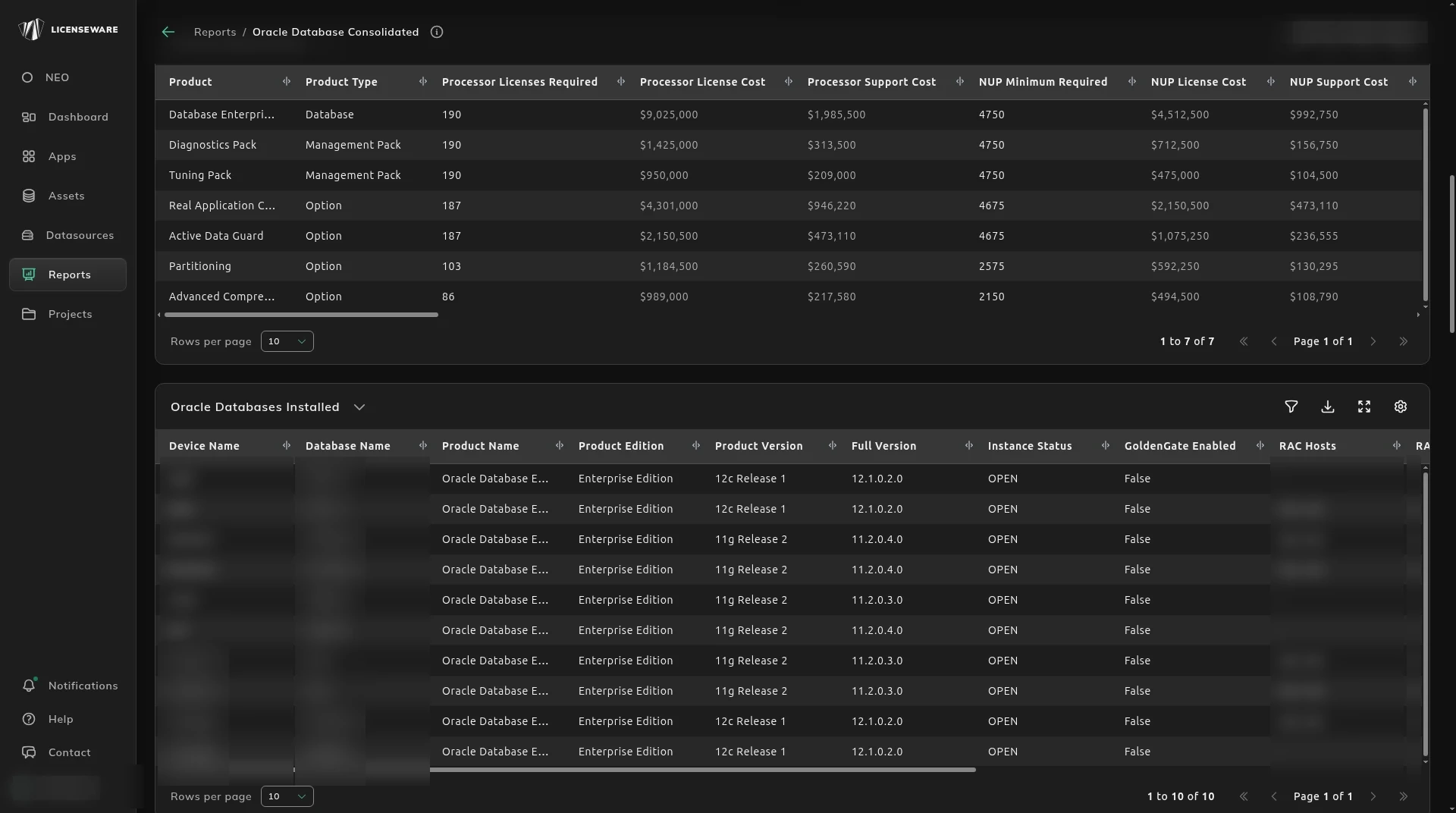
Section titled “What you would have to license”License Requirements is the product, its type, processor licenses required, processor license and support cost, NUP minimum, NUP license and support cost, whether verification is required, and whether host data is unknown.
Oracle Databases Installed is the database: device, name, product, edition, version, instance status, whether GoldenGate is enabled, RAC hosts and instances, application, environment, and source.
Unknown host data means the core count is not there yet. Where the host is incomplete, the report uses a conservative assumption so the exposure is not understated. Fix the host on Infrastructure Overview before you treat the cost as final.
This report needs both Infrastructure Mapper data and Oracle Database Manager data. Licensing quantities count processors where the feature is Used or Verify. Historical and Cloned stay visible so you can see them, and they are not the same as Used.
Real Application Clusters counts only when the number of members is more than 1. A single node with RAC enabled is not treated as licensable.
Infrastructure and capping
Section titled “Infrastructure and capping”Each database is mapped to its cluster, physical server, domain, pool and virtual device. Capping comes from the pool, the physical host and the cluster policy. Groups are labeled Capped or Uncapped. A structure such as Capped - Virtual or Uncapped - Incomplete decides the tier.
- A capped system is licensed at its defined limit.
- An uncapped or incomplete system uses the conservative calculation.
- The group is licensed once, at the right tier, so a cluster is not counted again for every guest.
- Processor totals are after capping, with the edition and the options in use, such as Active Data Guard or Diagnostics Pack.
On VMware, the counts include physical processors and cores at the device, the vCenter and the datacenter, and the virtual cores allocated to the database. That is what decides whether the license stays on the virtual machine or moves up to the physical host.
The server worksheet
Section titled “The server worksheet”Oracle Server Worksheet is the audit layout Oracle expects: each database on its capped device and virtual machine, the virtualization model, the version, the metric (usually Processor), and the options and management packs in use, such as Diagnostics Pack, Active Data Guard and Advanced Compression.
E-Business Suite and custom objects
Section titled “E-Business Suite and custom objects”EBS Releases lists the Applications system name, the Apps release and the database release, so a bundled Applications entitlement is not missed.
Database Modifications lists custom objects, the object type, when it was created and the last DDL. Use it when a development change, or an EBS integration, can change the license scope.
The comparison with what you own is the Oracle Effective License Position. The evidence behind Used, Verify and Historical is Oracle Database Usage.
Download on an aggregated table saves one row per device, with the user. See Using reports.