

Microsoft SQL Server Details
Microsoft SQL Server Details is the SQL Server position: which edition is installed, whether it sits on a physical host or a virtual machine, and how many core licenses that placement needs. An edition downgrade, or a host licensed the wrong way, is money. A missing core count is a guess.
Open it from Apps, then Microsoft Deployment Manager, on the Reports tab.
At a glance
Section titled “At a glance”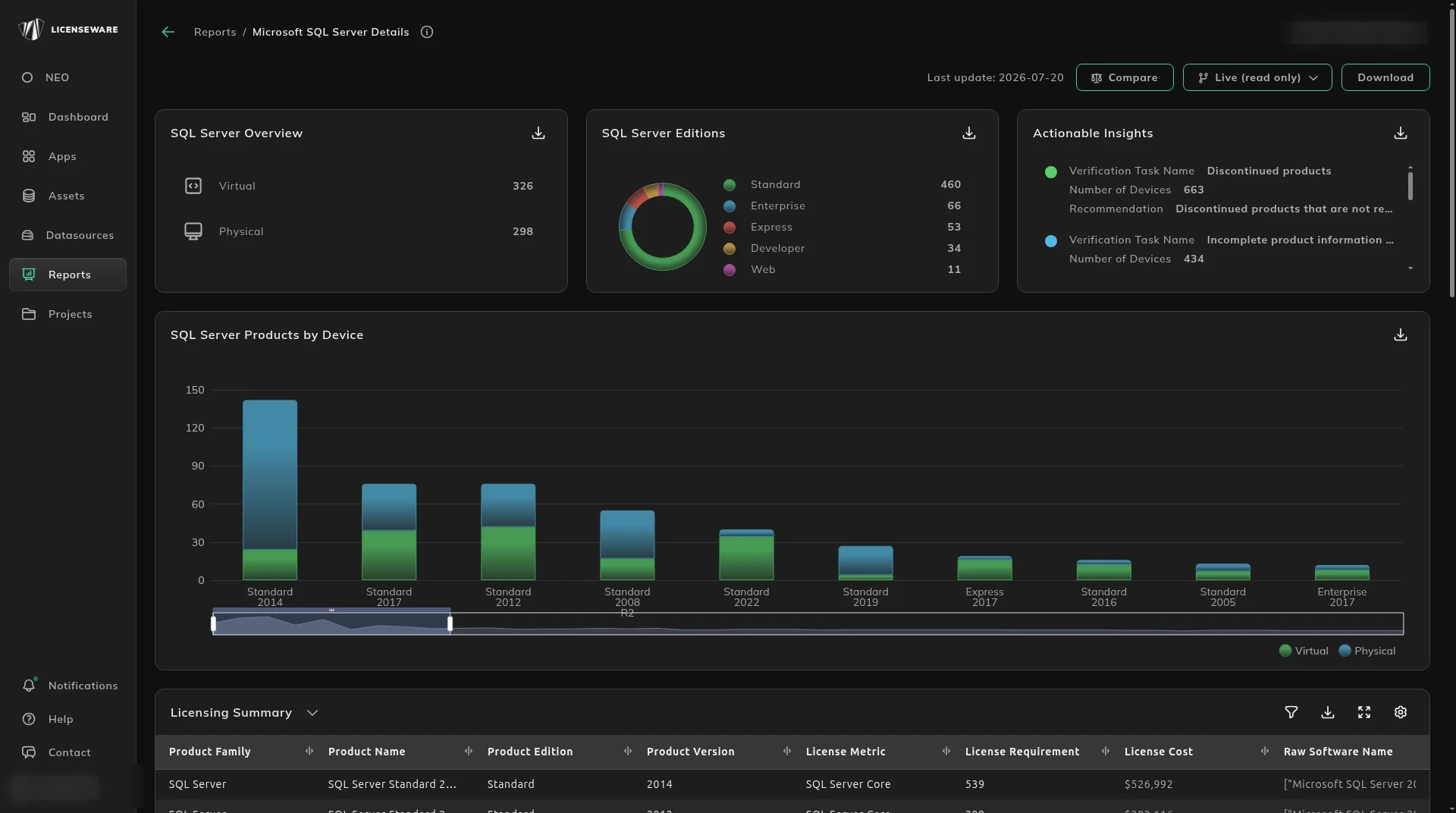
- SQL Server Overview splits Virtual and Physical.
- SQL Server Editions splits Standard, Enterprise, Express, Developer and Web. Express and Developer are not the same requirement as Enterprise.
- Actionable Insights is a task and the devices it affects, including discontinued products and evaluation software.
What the cores require
Section titled “What the cores require”SQL Server Products by Device is the install on each machine.
Licensing Summary is the rolled-up requirement: product family, name, edition, version, license metric, license requirement, license cost, and the raw software name. Download that table for one row per device, with the user. See Using reports.
SQL Server By Core Licensing is the host math: cluster, physical device, virtual device, licensable edition and version, core licenses required, the cost, the installed SQL products, and the CPU and core counts at the physical and virtual level. Notes and the source say where a figure came from.
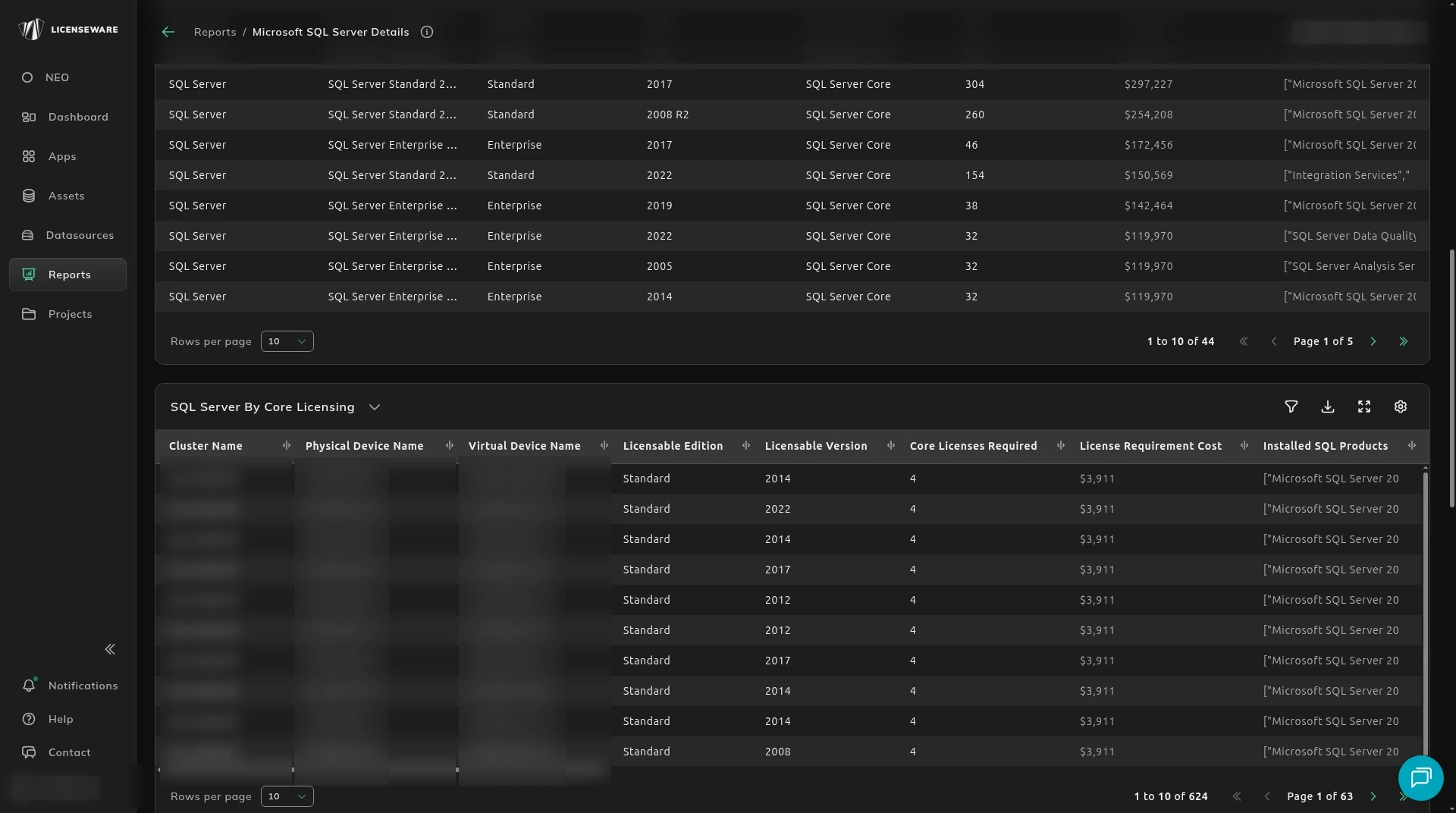
SQL Server By Core Licensing counts cores for every virtual machine and every physical device, and it counts every SQL component, not only the database. Hover a figure to see the raw software titles behind that requirement.
The table then keeps the highest database edition and the highest component edition and version, so you can see which install created the requirement. A component on a higher edition or version than the database raises the cost even when that component was not needed. That is the first place to look before a renewal.
Enterprise on the host, or each virtual machine
Section titled “Enterprise on the host, or each virtual machine”SQL Server Enterprise includes unlimited virtualization. The rule is not the same as Windows Server, because it depends on Software Assurance.
The host view lists each physical device, whether it is in a cluster, and every virtual machine on that host that has a SQL database or a SQL component. The licensable edition and version are the highest edition across those virtual machines and the host. The recommended edition follows the virtual machine count and the rest of the infrastructure.
- When licensing each virtual machine costs more than licensing the host with Enterprise, the recommendation is Enterprise on the host.
- When the host already has Enterprise and licensing the virtual machines is cheaper, the recommendation is the per-VM edition.
Check Enterprise feature use, and any other rights, before you downgrade a machine. The table is a place to look, not a change to make on its own.
In the cost columns, license cost with and without SA is the host licensed with Enterprise. Virtual license cost is the total from the by-core table. One worked case has the host, with or without SA, costing more than licensing each virtual machine.
The charts and the licensing requirement totals use that recommendation once. There is no double counting across licensing methods. A host is not counted again under a second method.
What else to check
Section titled “What else to check”Actionable Insights also flags software that needs client access licenses (CALs). Core licenses do not cover the CAL.
Host and cluster relationships come from Infrastructure Mapper. The estate-wide Microsoft cost is Microsoft Deployment Overview. How to correct a wrong edition is on Hardware assets.