

Renewals & Lifecycle
Renewals & Lifecycle is the calendar for the whole project. Quantity changes and cancellations only help if you know the date, the value, and who owns the contract before the quote arrives.
Open it from Apps, then License and Contracts Manager, on the Reports tab.
At a glance
Section titled “At a glance”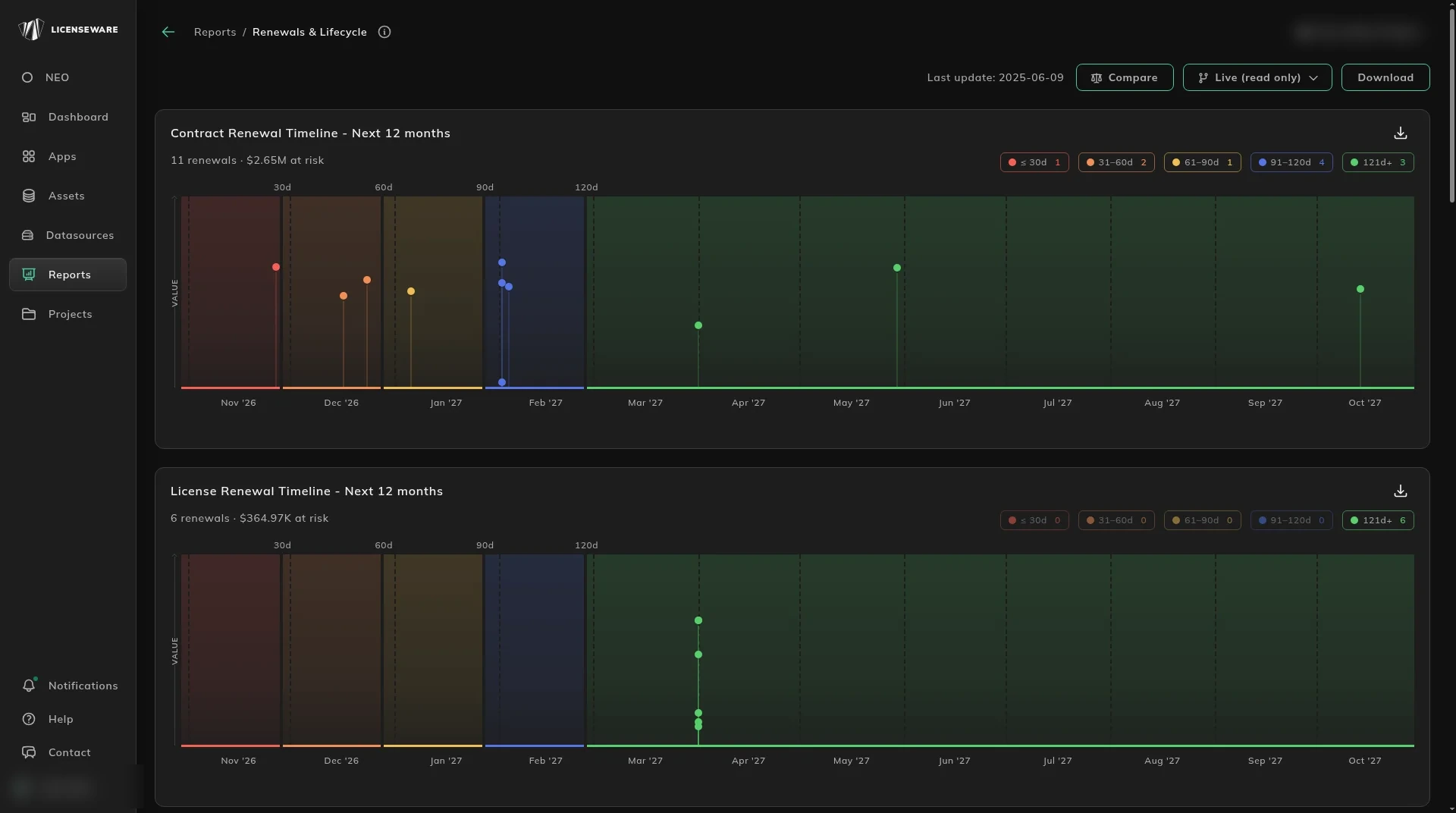
The top of the report is a scan of the next year, not the place you edit a contract.
- Contract Renewal Timeline - Next 12 months plots every upcoming renewal by month. The header carries the count and the value at risk, for example 11 renewals. The timeline is shaded by window: ≤30d, 31-60d, 61-90d, 91-120d and 121d+, with the count for each window at the top right. Use it to see how close each renewal is and how much is riding on it.
- License Renewal Timeline - Next 12 months is the same view for licenses. Standalone license renewals are included, not only licenses that sit on a contract. The report has a date source column and a label for where each date came from.
- Bands mark 30d, 60d, 90d and 120d. The legend chips are ≤ 30d, 31-60d, 61-90d, 91-120d and 121d+, each with a count.
- Renewal Spend by Type is a monthly stacked bar of renewal spend, split by
contract_type. It is the renewal cliff. Use it to find months that will take a disproportionate amount of procurement effort. - Renewal Spend by Vendor uses the same monthly axis, split by vendor, so you can see which relationship needs attention in a given month. Both charts are also split by currency.
The tables below are where you act.
Records you cannot renew yet
Section titled “Records you cannot renew yet”A contract with no value, no owner, or no notice period will renew on last year’s terms because nobody could prepare a case. Data Completeness - Action Items is the same table as on Software Licenses & Contracts, from the same engine. It lists the action, how many contracts it affects, the project total, coverage (higher is better), and severity. Actions include Add Financial Value, Business Unit, Cost Center, Renewal Notice, Department and Business Owner.
Severity reflects how much the missing field blocks LCM. High is a field that blocks the platform, above all total_value. Medium blocks a cut or a reminder: renewal_notice_days, Business Unit, Cost Center. Low is useful and does not block a core function: business_owner, Department. A High row is portfolio-wide. It means the field is missing on many or all contracts, not that one contract is the priority. The scoring is written out on Software Licenses & Contracts.
Actionable Insights names the contracts. Data Completeness says which kinds of issue you have. This table says which agreements to open: contract number, name, vendor, the actions still open, the action count, severity (the highest across that contract’s actions), value, currency and end date. It is sorted by severity and end date. Use it as the weekly worklist.
The lists show Days Remaining. A license also shows Lifecycle Status. Renewal Notice Days is a number on the contract or on a license, from Edit. See Set a renewal reminder.
What renews, and what already ended
Section titled “What renews, and what already ended”Upcoming Contract Renewals is the working list, sorted by end date: contract number, name, vendor, total value, currency, end date, days to end, renewal window, status, contract type, and business owner. Days to End and Renewal Window are computed against today’s date.
Upcoming License Renewals is the license on that contract: license name, publisher, metric, quantity, value, end date, and reminder date.
Expired / Not Renewed is what has already ended and has not been renewed, including Days Expired, the inverse of days to end. This is what fell through the cracks. Use it to see where the process failed, and to start a renewal conversation that is already late. An expired row is a lapse or a renewal you missed, not a saving, until you decide which it is.
Renewal notice
Section titled “Renewal notice”Set Renewal Notice Days and Licenseware emails a reminder on that day, then again at each of 90, 60 and 30 days that falls after it. See Set a renewal reminder for worked examples.
The control is Renewal Notice Days, on the contract or on an individual license, from Edit: a number of days before that contract’s or license’s end date. Both send the email. Contracts and licenses lists show Days Remaining. A license also shows Lifecycle Status.
How many days to choose, from 365 for a major enterprise renewal to 30 for an evergreen one, is on Set a renewal reminder.
Fill Renewal Notice Days when you load the contract or the license. Data Completeness keeps Add Renewal Notice as a Medium item until the field is set. This report is the portfolio view of everything coming up.
On the contract, Show details shows NOTIFICATION DATE and RECIPIENTS. RECIPIENTS are the users who get the reminder. They are picked from the users who have access to the project.
How to set it is on Set a renewal reminder. Spend across the whole portfolio, not only the next year, is Software Licenses & Contracts.
Download on an aggregated table saves one row per device, with the user. See Using reports.